Managing your site members
Site Members: Setting Up New Member Email Notifications
Stay on top of membership requests by receiving an email notification when visitors sign up to your site. Keep track of who is signing up and ensure that you can quickly approve and welcome them.
Before you begin:
Notifications are sent to the contact email listed on your site's Business Info page. Make sure your email address is correct to ensure you don't miss a notification. Learn more about adding your site's business information.
Setting up email notifications for new members
Turn on manual member approvals first to start receiving email notifications. Then, update your site's contact email address if required.
To set up new member notifications:
Go to Signup & Login Security in your site's dashboard.
Select Only people I manually approve in the Who can be a site member? section.
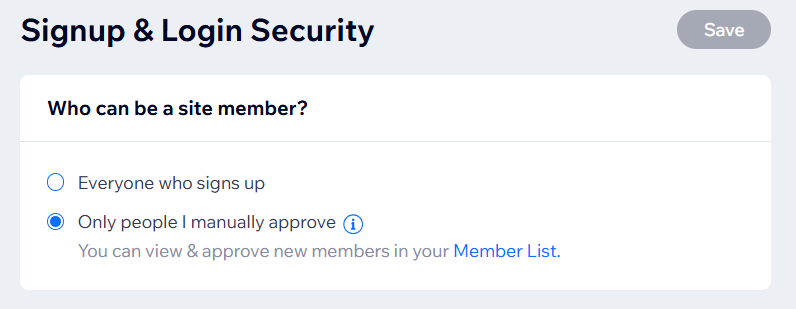
Click Save.
(Optional) Update your site's contact email:Go to Business Info in your site's dashboard.
Enter your email address in the Contact info section.
Note: If you have multiple locations, enter your email in the Default info section.
Click Save.
FAQs
Click a question below to learn more about new member email notifications.
Can I send notifications to a different email address?
No, it is not currently possible to receive new member notifications in a different email address. The notifications are sent to your site's contact email address. You can change this if needed from the Business Info page of your site's dashboard.
We are always working to update our products, so feel free to vote for this feature.
Where do I receive notifications if I have multiple locations for my business?
New member notifications are sent to the contact email address for your default location only, even if your business's other locations have their own email addresses.
Can I have someone else manage new member requests, like a site collaborator?
Collaborators can manually approve new members from the Pending column on the Site Members page in your site's dashboard.
Keep in mind that it is not possible to send new member request email notifications to a collaborator's email address. While you can have a collaborator or site owner manage new member requests, the email notifications will still be sent to the site's default contact email address. The site collaborator will need access to this email to receive notifications.
This article is credited to the Wix team - https://support.wix.com/
