Wix Editor: About Menus

Updated: 7 days ago
There are several types of menus that you may have on your site, including a site menu, anchor menu, language menu and member menus.
Site Menu
A site menu is an essential part of your website. Every site should have one as it allows your visitors to navigate between your pages and sections on your website.

All of our templates have a site menu already installed on them, but if you have started a website from scratch, make sure to add one.
Learn about menus on multi-page websites
On a multi-page website, the items on the menu display the names of the pages on your site. When you add a new page, a new item is added to the menu with the new page name. You can change the text on the menu items by changing the page names. Learn More
Learn about menus on one-page websites
One-page sites are built from several page sections. Each page section has an (invisible) anchor on it. These anchors are linked to the menu, and the anchor names are displayed on your menu.
This means that when your visitors click a menu item, they are taken to the relevant anchor/page section on your site.
In the screenshot below, you can see the page section "My Services" and its anchor:

You can change the text on the menu item by changing the anchor names.
We have tons of menu designs for you to use. Just click the Design icon

on your menu to see the different styles. You can also change between a horizontal and vertical site menu. Learn How
Anchor Menu
Display your anchors in a cool floating anchor menu. An anchor menu allows your site visitors to access different page sections on your site by clicking the anchor name on the menu.
As the anchor menu is floating, it is always visible wherever your site visitors are on your page.

As you can see in the screenshot above, it is possible to have a site menu and an anchor menu on the same website. The site menu at the top lets visitors navigate between the site pages, and the anchor menu on the right side lets visitors navigate between the sections on the page.
Learn more about anchor menus
Add and set up an anchor menu in just a few clicks. Learn How
Language Menu
Wix Multilingual lets you display your content in different languages, so visitors around the world can get the most out of your site. With Wix Multilingual, a language menu is displayed on your site, so that your visitors can change the language of your website in just one click.
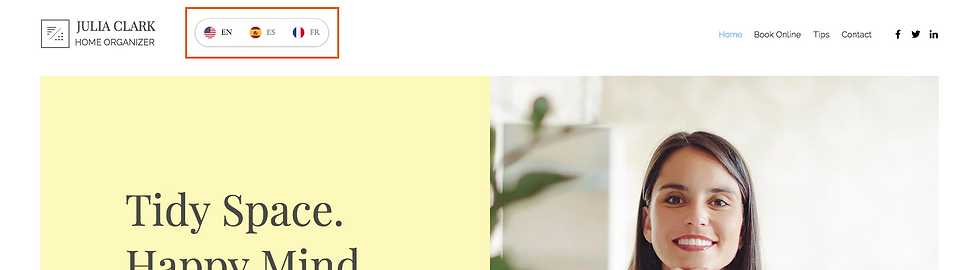
Learn more about Wix Multilingual and the language menu
The language menu is part of Wix Multilingual. Learn how to get started.
You can customize your language menu by clicking the Layout and Design icons:

Members Area Menus
The Members Area contains two different menus; the login menu and the member menu.
Login Menu
Once a member logs in to your site using the member login bar, they can see all of the member pages that they have access to. This menu drops down from the login bar and it includes a Log Out button:

Member Menu
When a member logs in to your site, they see another menu under their profile. This member menu displays all the pages inside a member's account such as My Account, My Orders or My Bookings.

Learn more about menus in the Members Area
You only have these menus on your site if you have a Members Area.
Learn how to add a Members Area to your site.
You can customize the login and member menus to match your site by clicking the Layout and Design icons:

Try your menu:
We recommend that you play with all of the menus on your live site or in preview mode to check that they are working properly. If you are experiencing problems, see our Menu Troubleshooter.
This article is credited to the Wix team - https://support.wix.com/ and we thank them for that!

Comments