Your sales reports by Wix Analytics help you to analyze all the payments that go through your site. All your sales data is translated into customizable reports to help you better understand what and how people are purchasing. You can view reports for sales by specific item, billing location, sales over time and more.
You can use your sales reports to plan your business strategy, make educated predictions about sales trends, and to get a better understanding of how your visitors are making purchases on your site.
How to access your sales reports:
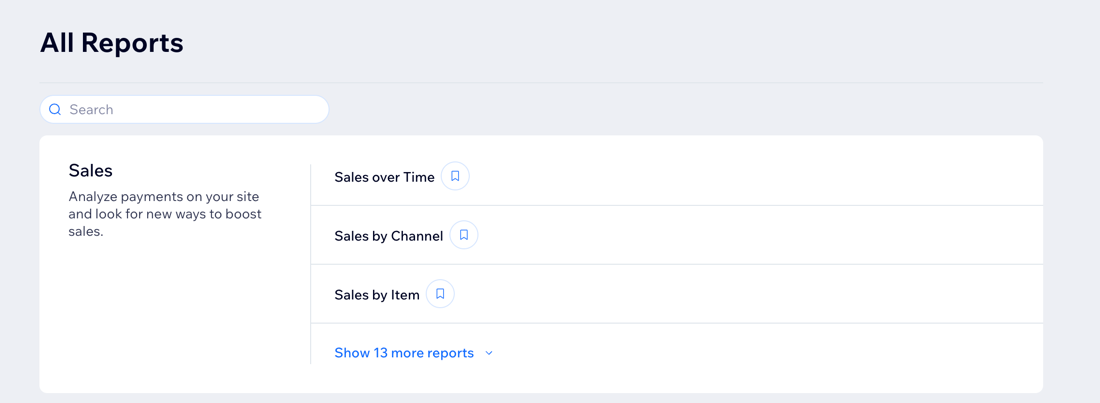
Go to All Reports in your site's dashboard and view the reports in the Sales section. You can also check out the Sales Overview to get a deeper understanding of your customers' spending trends.
Video tutorial
Watch this video tutorial to learn how to work with sales reports. Continue to read the article for more details on the types of sales reports offered.
Tip:
This video also covers payments and tax reports. Learn more about them and other accounting reports.
Types of sales reports
Wix Analytics creates sales reports for just about everything you want to know. See a breakdown of your revenue based on sales by coupon, order source, billing location, or shipping method. You can also view reports that track sales over a specific time period.
Click a report type below to learn more about it.
Sales over time
Sales over time allows you to compare your sales trends over different time periods. You can also select a measure to view over time including order quantity, refunds, gross sales and more.
Use this report to:
Monitor your sales, orders, refunds and other key performance indicators.
See how your sales are performing now compared to previous time periods.
Understand trends over time in sales distribution.
Sales by item
Sales by item gives you a breakdown of the specific items and services you've sold.
Use this report to:
View your sales data by orders, items, and customers and compare the info over time to identify trends.
Monitor total orders and item quantity over time.
Item sales over time
Item sales over time allows you to view a specific item's sales over the course of set time periods.
Use this report to:
See gross sales trends filtered by individual item.
See the sales trend of a group of items.
Compare the performance of item sales over different time periods.
Sales by coupon
The sales by coupon report shows you how many times your coupons have been used and how coupons are affecting sales.
Use this report to:
Find out who is using your coupons and filter by new or returning customers.
See where coupon users are located geographically.
Tip: Use coupon trends to determine if a promotion should be repeated or stop promotions that aren't delivering results.
Sales by channel
The sales by channel report shows you which channels bring you the most sales (e.g. web, mobile app, POS).
Use this report to:
Determine which sales channels are the most effective.
Gauge where to focus your sales efforts.
Sales by billing location
The sales by billing location report shows you where your customers are located.
Use this report to:
Filter sales by city, region, or country
Discover how a specific location is performing and if your actions have impacted your sales volumes.
Tip: Target locations with high sales volumes with email campaigns or paid ads. You can also offer promotions in locations where sales volumes are low.
Sales by order source
Sales by order source shows you a breakdown of item sales by the Wix apps installed on your site (e.g. Wix Stores, Wix Bookings, or Wix Restaurants).
Use this report to:
Find out which Wix apps are generating the most revenue on your site.
Check total orders, average order value, refunds and more per Wix app.
Average order value over time
Average order value over time displays your average value of orders for any day, week, or month.
Use this report to:
Find out how much your customers spend on average on your site.
Monitor changes in average order value (e.g. when offering discounts).
Learn the value of your users and tailor marketing campaigns for positive Return On Investment (ROI).
Sales by traffic source
Sales by traffic source shows you which traffic sources bring the most sales.
Use this report to:
Identify the most effective sources of traffic (e.g. social media, search engines).
See stats about each traffic source (e.g. average order value, total revenue).
Sales by currency
The sales by currency report shows a breakdown of sales based on the original currency of each order. This report is useful if you support multiple currencies on your site.
Use this report to:
Understand how much you're earning in different currencies.
View stats such as total sales, total orders, and more, in each currency.
Note: This report shows your sales before converting them to your site's main currency, as it appears in other analytics reports.
Sales by business location
Sales by business location displays sales performance for each of your business locations. This report is useful if your business has multiple branches.
Use this report to:
Gain insights into how each location is performing.
Track and compare sales performance across your business locations.
Note: This report is available for sites that have Wix Bookings, Wix Stores, or Wix Restaurants (New).
Sales by POS
The sales by POS report gives you a breakdown of sales done via Mobile POS and Wix POS Register.
Use this report to:
Understand how sales are performing through Mobile POS and POS Register.
Measure the efficiency of using POS systems for your sales.
Tips by staff
Tips by staff show you how much each staff member has earned in tips.
Use this report to:
Recognize top-performing staff.
Analyze data to improve staff training and customer service.
Note: Install the Wix Tips app to start using this report.
Tips by customers
Tips by customer show you which customers leave the most tips.
Use this report to:
Identify loyal or satisfied customers.
Learn more about customer behavior to improve your services and customer relationships.
Note: Install the Wix Tips app to start using this report.
Want to customize your report?
You can customize the data you're viewing and the way it's displayed. You can also save the views you want to return to later. Learn more about customizing your report.
FAQs
Click a question below to learn more about your Wix Analytics sales reports.
What is the difference between my sales and stores reports?
Sales reports refer to all purchases made throughout your site. This includes all bookings, services, coaching, consultations and more. Wix Stores reports focus on purchases and transactions made if you have an online store.
Why can't I see data for redeemed coupons in the Sales by Coupon report?
If you do not see coupon sales in the Sales by Coupon report, it could be for two reasons:
Coupon sales data is currently only available for these Wix apps: Wix Stores, Wix Bookings, Wix Pricing Plans, Wix Events, and the Wix Ecommerce platform. Data is not available for apps such as Wix Restaurants, Online Programs, Invoices, or other business apps.
If one of your coupons grants a 100% discount for a Wix Bookings order, then the transaction equals 0. Therefore, this coupon usage will not be counted or displayed in the Sales by Coupon report.
Note: These reasons are also why you may see coupon data listed as 'Unknown' in the Sales over Time report.
Why are some store orders showing “Unknown” under the billing location?
If a store order was made with POS (Point of Sale), it won't show the location information. In general, it is currently not possible to get location information for orders with POS transactions.
The only case in which location data can appear in your report is when the location information is populated from the checkout page in Wix Stores.
Why are there discrepancies between the Store Orders tab and sales reports?
You may see differences in the data presented in the Store Orders tab and Wix Analytics sales reports. This can happen for several reasons:
The Store Orders tab only shows data related to Wix Stores, while Analytics sales reports include sales data for all Wix apps on your site (e.g. Wix Stores, Wix Bookings, Wix Restaurants).
The Store Orders tab updates almost instantly after an order is placed. This data populates in sales reports 1 hour later.
Sales reports includes sales data for all payment methods (online, Paypal, offline/in-person).
Analytics sales reports include all orders with different payment statuses (e.g. paid, unpaid, refunded, partially refunded), while the Store Orders tab does not include this.
Tip: Add the 'Payment status' column to sales reports in order to better understand this data.
If you archive or cancel orders in the Store Orders tab, they are removed from the totals there, but they still appear in Analytics sales reports. This can make the total number of orders in sales reports higher than in the Stores Orders tab.
Tip: The main purpose of analytics sales reports is to give an overview of how well your business is performing as a whole.
Are gift card sales included in my Total Sales?
Yes, once a purchase has been made with a gift card the sale will be reflected in the Total Sales column.
How can I see a breakdown of orders and sales data for Wix Stores only?
Go to All Reports in your site's dashboard.
Select the Sales by Order Source report.
Click Filter.
Select Wix Stores under Source app. Make sure all other apps are not selected.
Click Apply.
In the Sales by Item report, why don't I see items from sales paid via invoices?
This is expected, as this information cannot be tracked in Wix Analytics.
Why are invoices showing different dates than when they were paid?
This is expected. Invoices in Sales reports are grouped by their issue date (i.e. the date the invoice was created), not by the date the invoice was paid.
Why is the date on my invoice different from the order date shown in sales reports?
You may find a discrepancy between the dates because they're displayed in different time zones. Wix Invoices displays the invoice date in your local time, while Wix Analytics reports show order dates in UTC.
Can I check the exact hour a sale was made on my site?
This is not possible at the moment, however you can group data by time period (e.g. by day, week, month).
Are cancelled and refunded orders removed from sales reports?
No, previously paid orders that were cancelled and refunded are still shown in sales reports. As a workaround, you can filter them out in Payment Status column or Fulfillment column to show only paid/fulfilled orders.
This article is credited to the Wix team - https://support.wix.com/ and we thank them for that!
