Accessing Your Editor

Updated: 6 days ago
Access your site's Editor any time you want to make changes to your site's content, design, themes or pages. After making your edits, make sure to publish (even if your site is already live) to make the changes go live.
Accessing your site's editor
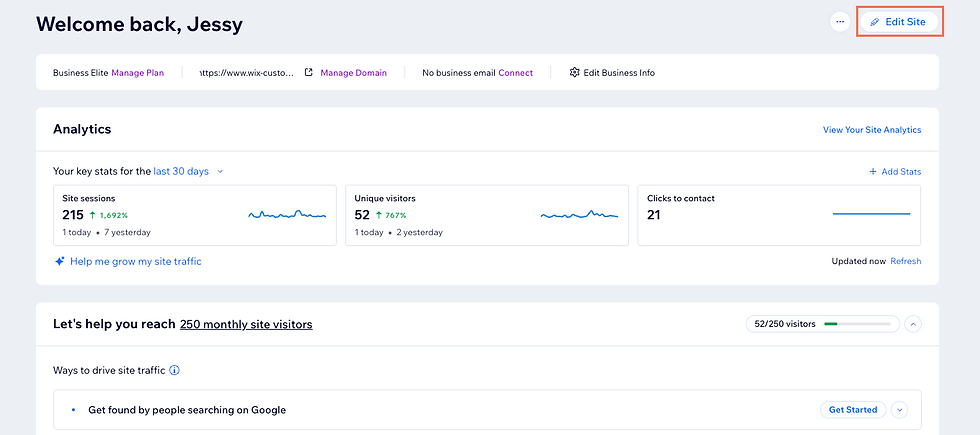
Regardless of which editor you're using, you can access it from your site's dashboard. Make sure you're signed in to the right account to edit your site.
To access your editor:
Click Edit Site.
Note: If you're opening your editor for the first time, you might see Design Site instead of Edit Site.
FAQs
Click a question to learn more about accessing your editor.
Why can't I find my site in my account?
It may be that you used a different email address when first signing up, or that you have more than 1 account. Using our Account Email Locator, you can check which email address you used when creating your site.
How can I access the editor of another site in my account?
If you have more than one site in your Wix account, click the Site drop-down at the top left of your site's dashboard to switch to another site and access the editor.

Learn more about managing multiple sites in your account.
Can I restore my site if I accidentally deleted it?
Yes, deleted sites are stored in the trash folder on the Sites page. Go to the trash folder and find the site you want to restore. Learn more about restoring sites from trash.
Why is my editor is not loading?
If you're unable to open your site's editor, you may be experiencing a local issue. Our Wix Technical Assistant will help you troubleshoot the most common issues.
How do I go back to a previous version after I have published my site?
You can view and restore an older version of your site at any time. Learn more about managing your site history.
Can I update my site without making the changes live yet?
Yes, you can make as many changes as you want inside your editor. As long as the changes are saved, and you don't click Publish, they will be waiting for you in the editor until you're ready to publish them. Learn more about saving your site.
This article is credited to the Wix team - https://support.wix.com/ and we thank them for that!

Comments