Table reservations
The Wix Table Reservations app offers a variety of automated notifications to keep your guests informed about their table reservations, including confirmations, updates, reminders, and cancellations.
You can turn email and SMS notifications on or off as needed and customize email content to align with your restaurant's branding and messaging.
Pre-installed notifications for your guests
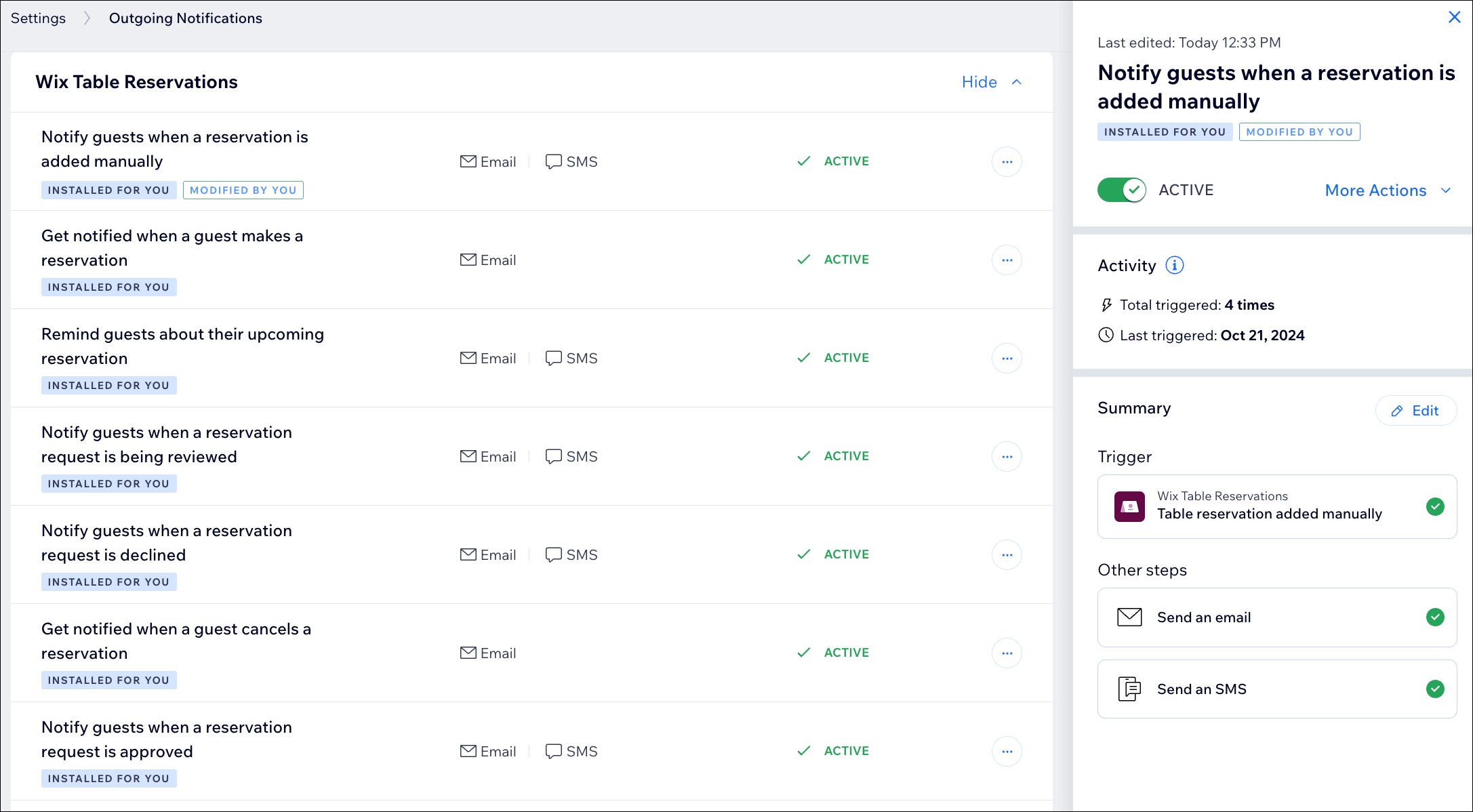
Notify guests when a reservation is added manually: Automatically inform guests via email or SMS when you manually create a reservation for them.
Notify guests when reservation time changes: Send updates via email or SMS to guests if their reservation time is modified.
Notify guests when a reservation request is approved: Let guests know by email or SMS when their reservation request is confirmed.
Notify guests when their reservation is canceled: Inform guests via email or SMS if their reservation has been canceled.
Notify guests when a reservation request is declined: Send an email or SMS to guests if their reservation request cannot be accommodated.
Send guests a confirmation for their online reservation: Provide an email or SMS confirmation for reservations made online.
Notify guests when a reservation request is being reviewed: Keep guests updated by email or SMS when their reservation request is under review.
In this article, learn more about:
Turning email and SMS notifications on and off
The Wix Table Reservations app allows you to manage automated notifications sent to your guests. You can disable email and SMS notifications or choose specific channels, giving you full control over the information guests receive about their reservations.
To turn notifications on or off:
Go to Table Reservations in your site's dashboard.
Click Settings at the top right.
Click Notifications.
Click Manage Notifications next to Email & SMS.
Scroll down to Wix Table Reservations and choose what you want to do:
Turn both Email and SMS notifications on/off: Enable or disable both email and SMS notifications together.Hover over the relevant notification and click View Summary.
Click the ACTIVE / INACTIVE toggle at the top to turn both email and SMS notifications on or off.
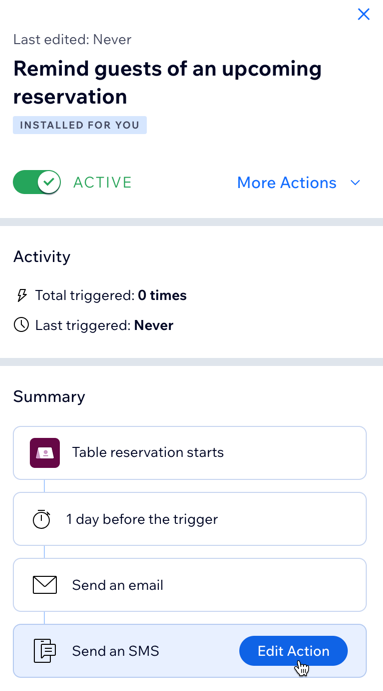
Disable a specific channel: Turn off either the email or SMS notification channel individually.Click the More Actions icon next to the relevant notification.
Click Edit.
Click the relevant ACTION box (Email or SMS) and click the Trash icon.
Note: To reset to default settings, click the More Actions icon next to the notification and select Revert to default.
Note:
Your monthly SMS message limit is determined by your SMS quota, which varies based on your site's plan. To view your quota, go to SMS Settings in your site's dashboard.
Customizing email notifications sent to guests
Customize the email notifications that are automatically sent to your guests about their table reservations. You can also preview your email notifications and send a test to an email of your choice.
Notes:
Currently, you can edit email notifications, but SMS messages cannot be edited.
It is not possible to delete "Installed for you" automations, but you can deactivate them.
To customize the email notifications you send:
Go to Table Reservations in your site's dashboard.
Click Settings at the top right.
Click Notifications.
Click Manage Notifications next to Email & SMS.
Hover over the Wix Table Reservations email notification you want to customize and click Edit Action.
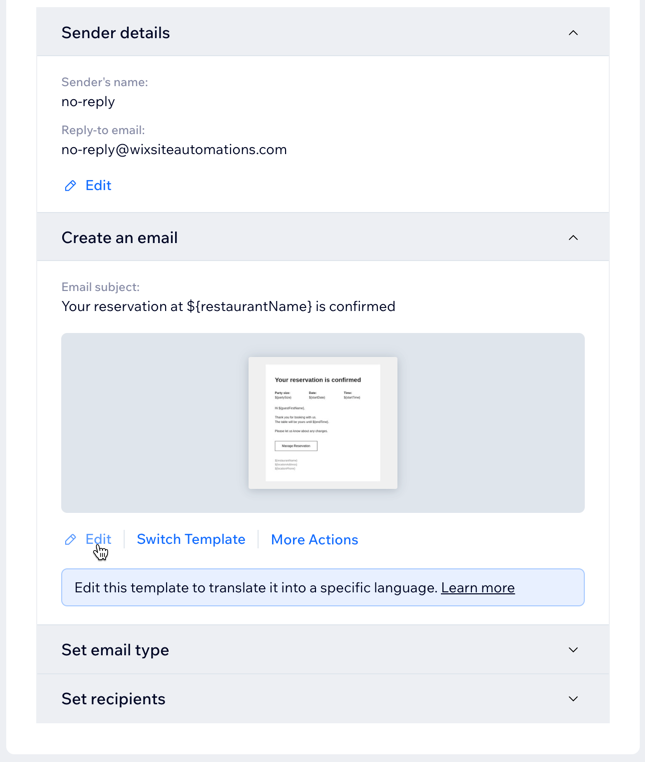
Click Edit under Create an email to customize your automated email.
Tip: Click Preview & Test to preview and send a test email. Click Back to Editing to continue editing the email.Click Save & Continue at the top right.
Click Apply.
Tip:
Learn more about customizing your automated emails.
FAQs
Click on a question below to learn more about sending notifications with the Wix Table Reservations app.
Can I edit the sender details for email notifications?
Yes, you can edit the name and reply-to email address in notifications sent to your guests.
To update your sender details:
Go to Settings in your site's dashboard.
Click Outgoing notifications.
Hover over any Wix Table Reservations email notification and click View Summary.
Click More Actions and select Edit.
Click Edit under Sender details.
Click the More Actions icon
to update your sender details:Sender's name: Edit the name that will appear in the recipient's inbox.
Reply-to email: Edit the email address people reach when they reply.
Click Save.
Note: Before saving the updated sender details, you must confirm access to this account. A confirmation code will be sent to the new reply-to email address. Enter the code and click Confirm.Click Save to apply your changes.

How do I manage the notifications I receive for table reservations?
You can choose to receive notifications via your site's dashboard and/or email. By default, these notifications are enabled, but you can turn them on or off at any time. Learn more about managing your notifications for table reservations.
Is there a quota for SMS notifications?
Yes. The number of SMS messages you can send each month is determined by your SMS quota, which varies based on your site's plan. To view your quota, go to SMS Settings in your site's dashboard. Learn more about Wix SMS.
