Managing your posts
Wix Blog: Adding HTML Code to a Blog Post
Use HTML to embed an iframe (external code or components) in a blog post or display an external site.
Important:
Make sure to read through the limitations of the HTML element before using it.
To add HTML code to a blog post:
Go to Blog in your site's dashboard.
Click Edit on the relevant blog post, or Create New Post to write a new one.
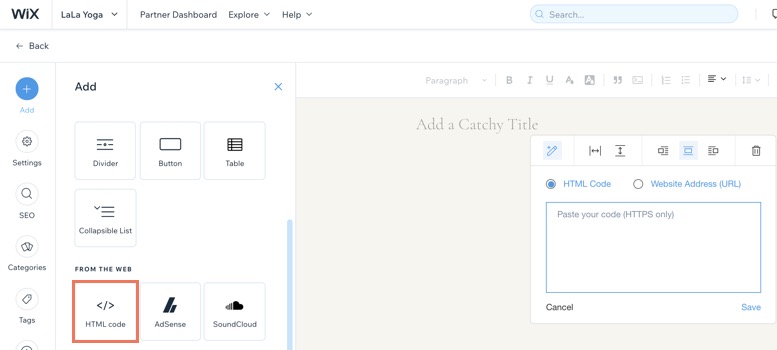
Click Add
 on the left side.
Click HTML code.
Do one of the following:
Add HTML code: Adds features from external sites using HTML code.Click HTML Code.
Enter your HTML code.
Click Save.
Embed an external site: Displays an external site in a window in your post.Click Website Address (URL).
Enter a URL.
Click Save.
(Optional) Customize the element using the options; width, height and alignment.
Learn how to retrieve an HTML code from these third-party sites:
SoundCloud - Embed a music track
Google Maps - Embed a map
Instagram - Embed a picture
Vine - Embed a post
Twitter- Embed a timeline
Pinterest - Embed a Pinterest feature
Facebook - Embed posts
VK - Embed a VK feature
This article is credited to the Wix team - https://support.wix.com/
