Before you begin:
This article is for merchants using the Wix POS Register, the HP tablet-based solution for brick-and-mortar businesses. If you're using Wix Mobile POS, this feature is not available.
Recurring pricing plans are not supported.
Pricing Plans on Point of Sale (POS) lets you sell free and one-time payment plans in person. You can manage active subscriptions from the Customer page and review plan orders in your Sales History.
Selling a Pricing Plan at checkout
Set up your pricing plans in the dashboard before selling them on the POS. Only free and one-time payment plans are available at checkout.
To sell a Pricing Plan:
Open the POS tablet.
Tap Checkout in the navigation menu.
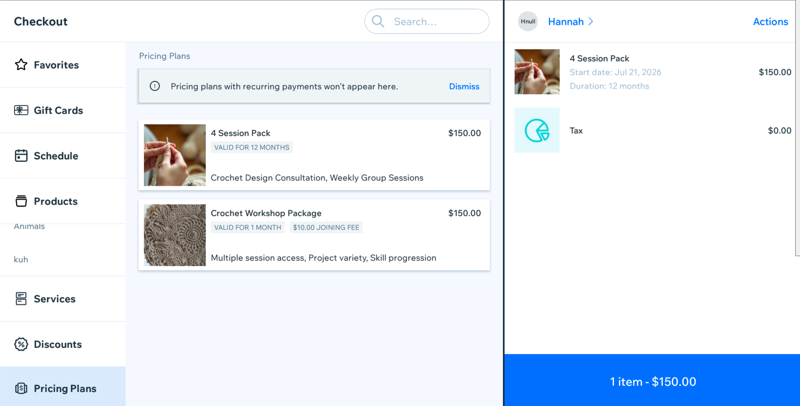
Tap the Pricing Plans tab.
Browse the list and tap a plan to add it to the cart.
Select a customer.
(If relevant) Select a start date and tap Continue.
Tap the total at the bottom of the screen.
Accept payment by Card, Cash, or Manual Card Entry.
Note: A Card Reader must be connected to pay by card.
Complete the checkout to confirm the sale.
Notes:
If the plan includes a joining fee, it appears as a separate line item in the cart.
You can only add one pricing plan per transaction. Pricing plans can't be combined with other products in the same cart.
Viewing Pricing Plan orders in Sales History
Completed Pricing Plan sales appear in Sales History with your other POS orders.
To view a Pricing Plan order:
Open the POS tablet.
Tap Sales History in the navigation menu.
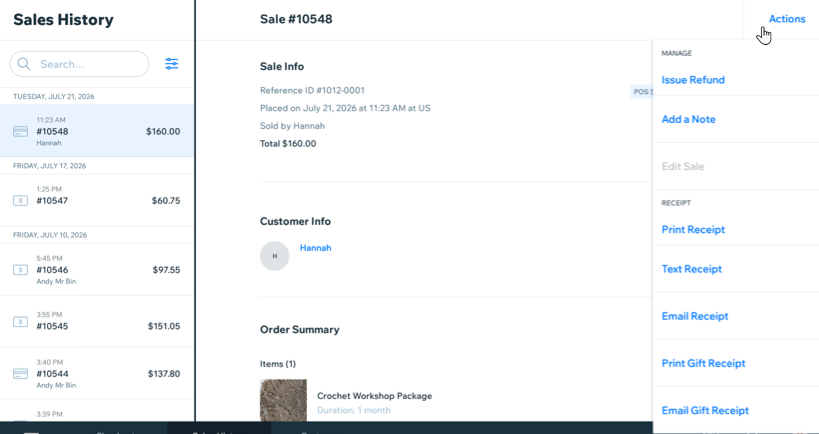
Find and tap a pricing plan order to open the order details.
Tap Actions at the top right and select an option:
Issue Refund
Add a Note
Print Receipt
Text Receipt
Email Receipt
Print Gift Receipt
Email Gift Receipt
Managing a customer's subscription
Manage active subscriptions from the Subscriptions tab on the Customer page.
To manage a subscription:
Open the POS tablet.
Tap Customers in the navigation menu.
Find and tap the customer.
Tap the Subscriptions tab.
Tap the subscription you want to manage.
Tap Manage and choose what you'd like to do:
For an active subscription
Pause subscription: Choose when to pause and, optionally, when to resume. Note: The customer won't be charged or able to use the plan while it's paused.
Extend subscription: Add time to the current billing period.
Cancel subscription: The plan ends immediately. Go to your payment provider if a refund is needed.
For a paused subscription
Resume subscription now: Reactivate the subscription immediately.
Change resume date: Update the date the subscription will resume.
FAQs
Click a question below to learn more about pricing plans on POS.
What payment methods are accepted for pricing plans?
You can accept Card, Cash, or MOTO (Mail Order/Telephone Order). The Other payment method is not currently available for pricing plans.
Can I add a discount or coupon when a pricing plan is in the cart?
No. When a pricing plan is in the cart, you can't add discounts, coupons, loyalty redemptions, custom charges, or other products. To add these items, first remove the pricing plan from the cart.
Can a cart contain more than one pricing plan?
No. Each cart can contain a maximum of 1 pricing plan at a time.
Does a customer need an email address to purchase a pricing plan?
Yes. Customers must have an email address on file. If they don't, add one to their profile before completing the sale.
This article is credited to the Wix team - https://support.wix.com/ and we thank them for that!