Showcase and attract more visitors to a portfolio project by adding it to a site menu. By linking your project to a menu, site visitors can click into your work from any page on your site.

To add a project page to a site menu:
Wix Editor
Click the menu you want to add a link to.
Click Manage Menu.
Click Add Menu Item on the left and click Portfolio page.
Click the Which page? drop-down and select Project pages.
Click the Which item? drop-down and select the project you want to link to.
Note: This option only appears if your projects are connected to a collection, andyou have more than one project within that collection.
Click Done.

Studio Editor
Click the menu you want to add a link to.
Click Manage Menu.
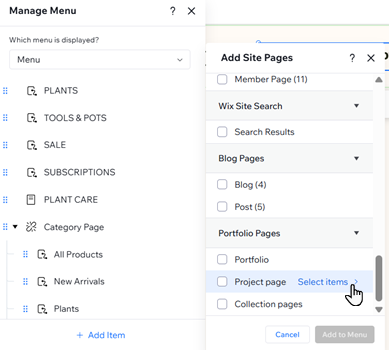
Click + Add Item.
Click Site Pages.
Click Select items next to Project pages.
Select the checkbox next to the relevant project page.
Click Add to Menu.
Wix Harmony Editor
Click the menu you want to add a link to.
Click Manage Menu on the action bar.
Click + Add Item at the bottom and click Site pages.
Click Select items next to Project Page.
Select the checkbox next to the relevant project page.
Click Add to Menu.
This article is credited to the Wix team - https://support.wix.com/ and we thank them for that!