With Wix Photo Albums, you can create a custom URL for your album for a more personalized and professional look. Your photo album then receives a subdomain which is connected to your domain.
About your subdomain
A subdomain is a small piece of text that is added to your main domain name. If you've connected a domain to your site, your custom subdomain replaces the "www" part in the beginning. If not, it comes after your site domain as follows:
Before the domain: https://album123.mystunningwebsite.com
After the domain: https://mystunningwebsite.wixsite.com/album123
New Photo Albums are now built on Studio templates:
Old free album URLs have the following structure: https://mystunningwebsite.wixsite.com/album123
New free album URLs have the following structure: https://mystunningwebsite.studio.io/album123
If you have more than one domain connected to your site, the subdomain is connected to your primary domain.
Guidelines for your custom URL
Please follow these guidelines when choosing a subdomain:
Characters must be in US-ASCII. For example, characters such as ¥, ñ, etc., are invalid.
Characters can only be ASCII letters, digits and hyphens.
Hyphens cannot appear at the beginning or the end of the domain name.
Total length can be no more than 20 characters.
ab-- form will violate the IDNA restrictions(-- cannot appear in the 3rd and 4th locations). The only string that allows this form is the one prefixed with xn--, which represents Punycode (usually used for non-latin domain names).
Important:
If a site collaborator without domain permissions publishes an album, this album will use a free URL that includes the collaborator’s username. To ensure all albums use your custom domain, give relevant collaborators a role with domain permissions:
Admin (Co-Owner)
Billing Manager
Domain Manager
A custom role that includes domain permissions
Learn more about roles and permissions.
Troubleshooting your album URL
If you are unable to view your album after changing its URL, follow the troubleshooting steps below:
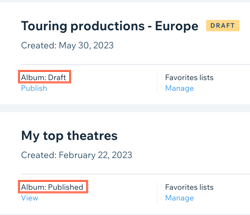
Step 1 | Make sure that your album is published
Your subdomain is created when your album is published.
Ensure that your album is published:
Go to Photo Albums in your site's dashboard.
Check that your album's status is Published.
Step 2 | Make sure that your site has been upgraded
Your subdomain can only be connected if your site has been upgraded to a Premium or Studio site plan.
View the Premium subscriptions in your account to ensure that your photo albums site is upgraded.
Step 3 | Wait up to 24 hours after connecting your domain
After upgrading your site and connecting your domain, it takes up to 24 hours for the new album subdomain to propagate.
Step 4 | Check your domain connection
Your subdomain only works if your domain is connected properly. To verify that your domain is connected properly:
Access the Domain Assistant.
Follow the instructions according to your situation in order to troubleshoot your domain connection.
Notes:
Subdomains cannot be connected to a domain that is connected to Wix via Pointing. Learn how to switch your domain connection method.
If your domain is not properly connected to Wix, you may see a 404 error and issues with the SSL server telling you that your connection is not secure.
This article is credited to the Wix team - https://support.wix.com/ and we thank them for that!