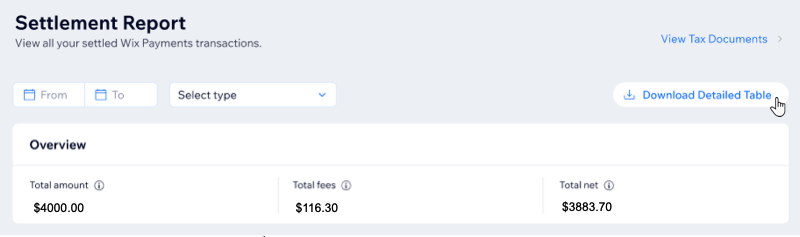
Your settlement report includes any payment you've ever received through Wix Payments. Find detailed information about each transaction like its current status, relevant payout and the exact service fee charged by Wix Payments.
Viewing your settlement report
The settlement report lets you view each transaction’s details and download a full report for your records or accounting needs.
To view your settlement report:
Go to your Settlement Report in your site's dashboard.
(Optional) Filter by transaction type and date range, or click Download Detailed Table to download a CSV file of your settlement report.
Tip:
You can still access your Wix Payments dashboard, even if your Wix Payments account has been disconnected.
FAQs
Click a question below to learn more about viewing your settlement report.
Can I access my dashboard if my Wix Payments account is disconnected?
Yes, You can still access your Wix Payments dashboard, even if your Wix Payments account has been disconnected.
Are the settlement report dates based on my site's time zone or my computer's time zone?
The dates are based on your site's time zone, even if this is different from the time zone on your computer.
Note: Ensure that your site's time zone is correctly set to avoid any confusion with payout timings.
Are there any fees for downloading the settlement report?
No, there are no additional fees for downloading your settlement report from the Wix Payments dashboard.
This article is credited to the Wix team - https://support.wix.com/ and we thank them for that!