Wix Payments gives you control over when payouts are sent to your bank account. Select a payout schedule that meets your needs and change it at any time.
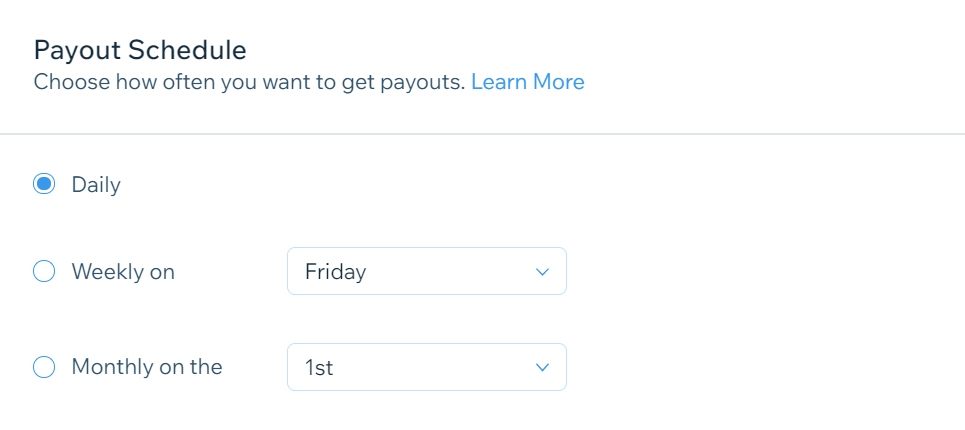
There are three payout schedules to choose from:
Daily: Payouts are sent every day, including transactions that were processed before the daily cut-off time*. Any transactions received after that time will be included in the next day's payout.
Weekly: Payouts are sent every Monday. You can change this to any other day of the week through your account settings.
Monthly: Payouts are sent on the 1st of every month. You can change this to any other day of the month through your account settings.
Changing your payout schedule
Go to Accept Payments in your site's dashboard.
Click Manage next to Wix Payments.
Scroll down to Payout Schedule.
Select the checkbox next to the relevant option:
Daily
Weekly
Use the drop-down menu to select a day.
Monthly
Use the drop-down menu to select a day.
Click Save.
FAQs
Click a question below to learn more about payouts from Wix Payments.
Is there a minimum balance required for payouts?
Yes, payouts are only made if there's an available balance of at least $1 in your Wix Payments account.
What time are daily payouts processed?
Daily payouts are processed at 6AM EST for the United States and Canada and 6AM GMT for Europe. Transactions processed before the cut-off time are included in that day's payout, while transactions after the cut-off time are included in the next day's payout.
What happens to my monthly payout if the month has fewer than 29 days?
If the month has fewer than 29 days, payouts are sent on the last day of the month.
This article is credited to the Wix team - https://support.wix.com/ and we thank them for that!