Currently, there is no migration tool available to automatically switch an existing form built with the old Wix Forms app to the new Wix Forms app.
To move to the new app, you need to manually delete your form built with the old app and recreate it with the new Wix Forms app. This ensures you get access to the latest features and design options.
Step 1 | Remove the old Wix forms app from your site
Before you add the new app, delete the form built with old app from your site to avoid confusion and duplicate submissions.
To remove an old Wix Form:
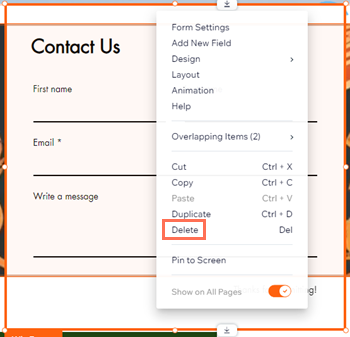
Right-click on the form.
Click Delete.
Tip:
If you want to keep any responses or settings from the old form, record that information before deleting it.
Step 2 | Add the new Wix Forms app to your site
After deleting the form built with the old Wix Forms app, it's time to add the new Wix Forms app to your site.
To add a new Wix Form:
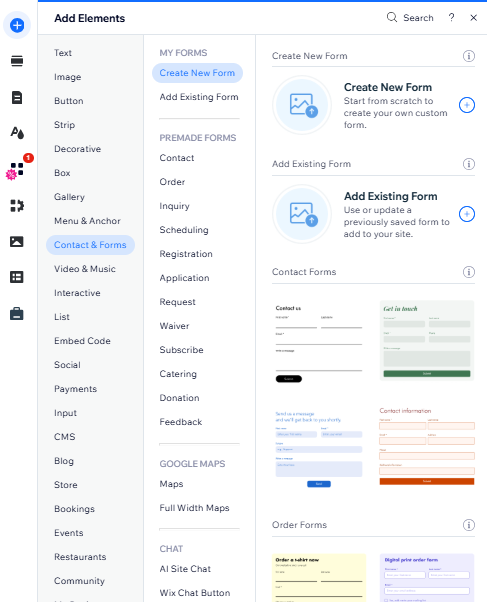
Click Add Elements

.
Click Contact & Forms.
Click Create New Form.
Tip: You can also select a form from the Premade Forms section.
Ready to customize your form's design?
Once you've set up your form, you can personalize it's look. Learn more about customizing your form's design.
FAQs
Click a question below to learn more.
Can I copy submissions from my old form into my new form’s submission table?
No. Old submissions stay linked to the old form and do not appear under your new form. If you want to keep this information, download the submissions from the old form before you delete it.
Why should I use the new Wix Forms app instead of the old Wix Forms app?
The new Wix Forms app offers improved customization, mobile responsiveness, better integrations, and a smoother experience for you and your site visitors.
This article is credited to the Wix team - https://support.wix.com/ and we thank them for that!