Wix Events lets you create two types of events: RSVP events and Ticketed events. Choosing the right type ensures a smooth experience for you and your attendees.
Note:
Selling event tickets requires a Premium plan.
RSVP events
RSVP events allow you to track attendance without issuing tickets. Guests confirm their attendance in advance using a registration form, making them ideal for weddings, private parties, and community gatherings.
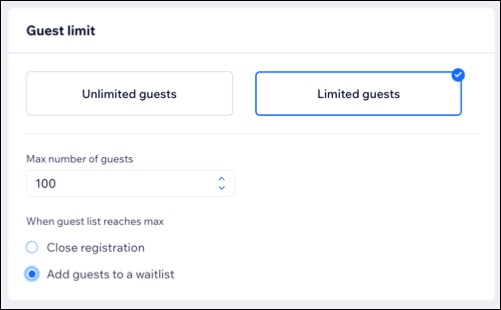
You can set a guest limit, enable a waitlist, and send automated emails to keep attendees informed when spots open.
Collect guest details through a registration form
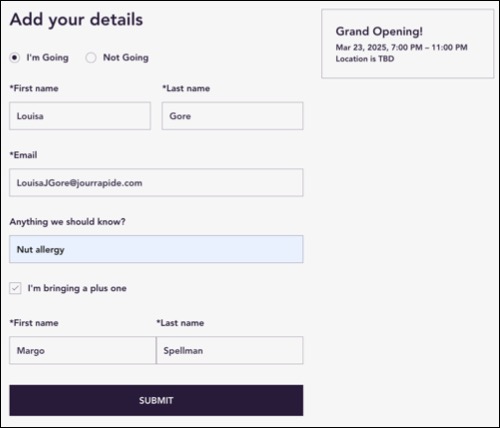
When guests RSVP, they fill out a registration form with basic details like name, email, and any additional information you request, such as meal preferences or extra guests.
Manage registration settings and event emails
You can create a waitlist, and guests will be automatically notified when spots open up based on your guest limit. Additionally, you can customize emails, including confirmations, event reminders, and waitlist notifications.
Ticketed events
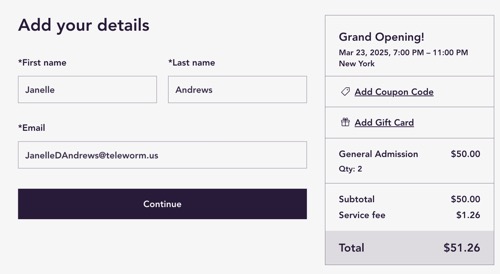
Ticketed events are perfect for occasions like concerts, festivals, workshops, and conferences, where guests require tickets, whether free or paid. Guests will complete a checkout form that includes details such as ticket quantity, payment, and billing information
Additionally, you can apply taxes, offer membership plans, and provide discounts.
Customize your tickets and seating options
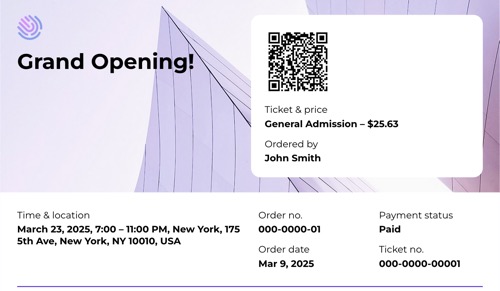
You can offer different ticket types (e.g., Orchestra, Balcony) and set a price for each. By designing a seating map for your venue and linking each ticket type to specific seats, guests can choose their preferred seats when purchasing.
Additionally, you can customize the appearance of your tickets based on factors like the event type, entrance locations, or ticket categories (e.g.child and adult).
Choose how to collect guest information during checkout
When setting up your ticketed event, you can choose how guest information is collected during checkout. There are two options for the checkout form:
1 form per order: A single form is used for the entire order, regardless of the number of tickets purchased, collecting all guest information in one place.
1 form per ticket: A separate form is used for each ticket purchased, allowing you to collect individual guest information for each ticket, even if multiple tickets are bought in one order.
Tip:
When selling tickets, you can authorize payments to secure funds before processing orders, with the option to capture them automatically or manually.
FAQs
Click a question below to learn more about RSVP and Ticketed events.
Can I create an event where no RSVP or ticket is required?
Yes. You can create an event that doesn’t require registration.
Go to Events in your site's dashboard.
Click to select the relevant event.
Click the Settings tab.
Click Edit next to Registration settings.
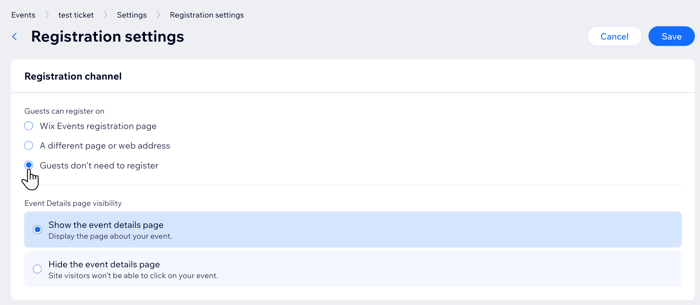
Select Guests don't need to register under Guests can register on.
Choose the Event Details page visibility:
Show the event details page: Display event information.
Hide the event details page: Visitors won’t be able to access or click on your event.
Can I change the registration status for an RSVP and Ticketed event?
Yes. You can change the registration status at any time. Guests can register only when the status is 'Open'. If set to 'Closed', visitors will see a 'Registration is closed' message on the event details page.
Can I cancel an event with tickets?
Yes. You can cancel a ticketed event. Just make sure to notify your guests, update the status to "Canceled," and issue refunds where needed.
How can I send automated reminders for events?
You can schedule reminder emails for both ticketed and RSVP events. Alternatively, you can create an automation to trigger SMS reminders.
This article is credited to the Wix team - https://support.wix.com/ and we thank them for that!