A contact's subscription status determines what types of email or SMS content you can send them. Contacts in your Wix account have one of the following subscription statuses:
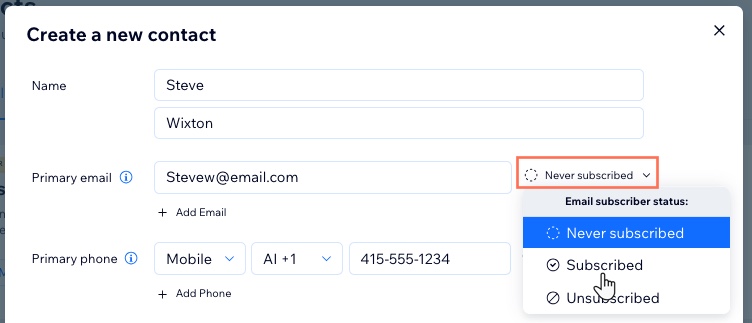
Never subscribed: These are contacts who interacted with your site but did not opt in to your mailing list. They may receive occasional notifications, but you should not send them any marketing emails or text messages.
Subscribed: These are contacts who have opted in to your mailing list. You can send them updates, blog posts, and marketing emails.
Unsubscribed: These are contacts who actively unsubscribed from your mailing list. They do not receive notifications from your site, and you should not send them any marketing emails or text messages.
Changing a contact's subscription status
You can update a contact's subscription status from Contacts in your site's dashboard.
Before you begin:
We recommend that you review email marketing laws and best practices.
To change a contact's status:
Go to Contacts in your site's dashboard.
Click the More Actions icon

next to the relevant contact and select Edit.
Choose the type of subscription status you want to update:
Click the Never subscribed drop-down next to Primary Email and select a new subscription status.
Click Save.
SMS
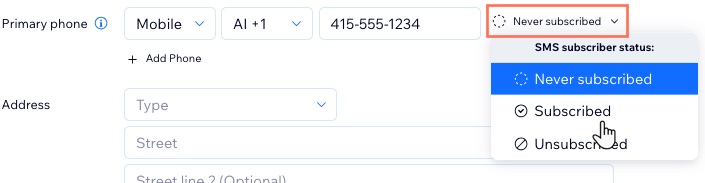
Note: SMS subscription status is not currently available for all users.
Click the Never subscribed drop-down next to Primary phone and select a new subscription status.
Click Save.
FAQs
Learn more about contacts' subscription status' below.
How do I view the subscription status of a contact?
You can view the current subscription status of the contact at any time under the Email and Phone columns.

This article is credited to the Wix team - https://support.wix.com/ and we thank them for that!