Chat with your site visitors in all languages your multilingual site offers. With Wix Multilingual, you can easily translate your chat's automated messages, channels, lead capture form, and more.
Before you begin:
Add and set up Wix Multilingual.
Translating Wix Chat
Translate your chat to expand your global reach, diversify your site content and craft a chat experience tailored to your visitors.
Tip:
You can fully translate your pre-chat form, as well as the text your chatbot displays.
To translate your chat:
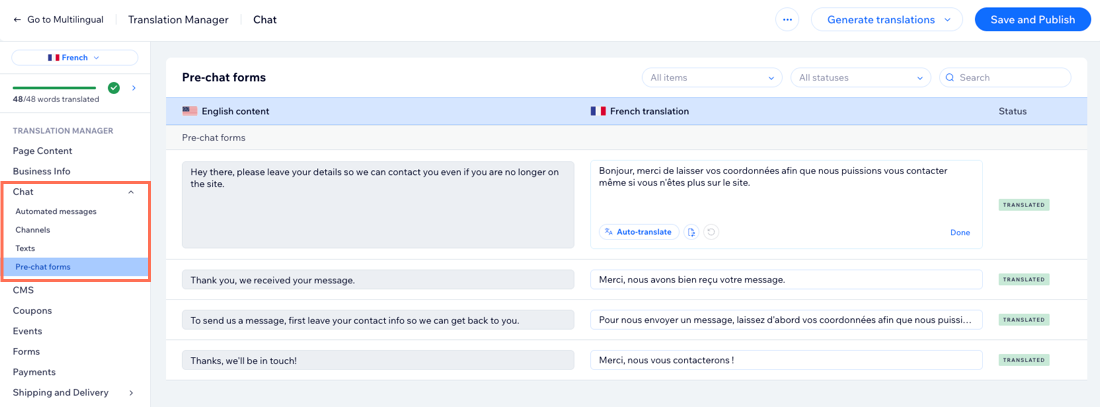
Go to Translation Manager in your site's dashboard.
Click Chat on the left.
Select the content you want to translate: Automated messages, Channels, Texts, or Pre-chat forms.
Choose the relevant option:
If you auto-translated your site: Review the automated translations and edit if necessary.
If you didn't use auto-translation: Translate the fields manually. You can also click Auto-translate below a field to automatically translate that specific field.
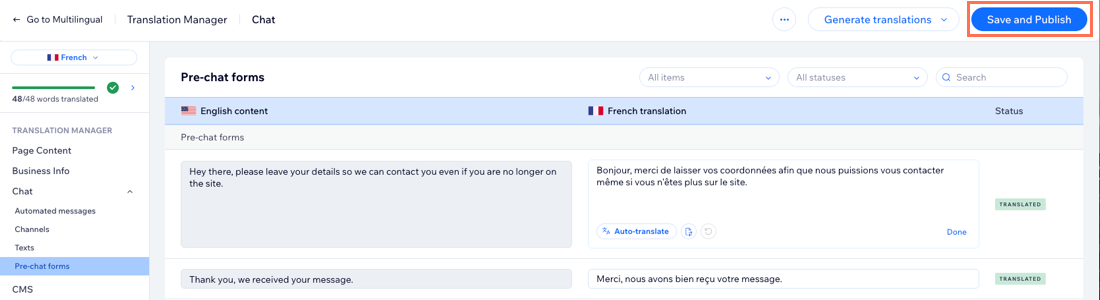
Click Save and Publish.
FAQs
Click a question below to learn more about translating Wix Chat:
Is all text in Wix Chat translatable?
Certain text in the Wix Chat front (e.g. the "Type your message" text) is generated automatically and cannot be translated manually with Wix Multilingual.
This text translates automatically in the following languages: Arabic, Bulgarian, Chinese (Traditional), Czech, Danish, Dutch, French, German, Greek, Hebrew, Hindi, Hungarian, Indonesian, Italian, Japanese, Korean, Malay, Norwegian, Polish, Portuguese, Romanian, Russian, Spanish, Swedish, Tagalog, Thai, Turkish, and Ukrainian.
Are changes I make to Wix Chat in my main language automatically updated in my secondary language(s)?
No. Changes you make to Wix Chat content in your main language are not automatically updated in your secondary language(s).
Each time you make an update to your chat's content, make sure to translate it in the Multilingual dashboard.
This article is credited to the Wix team - https://support.wix.com/ and we thank them for that!