You can remove Wix Bookings from your site by deleting the Bookings Pages in your editor. Once you delete them, all elements connected to Wix Bookings disappear from your site and dashboard.
Important:
Deleting Wix Bookings does not cancel your site upgrade. Learn how to cancel a Premium or Studio plan.
If you re-install Wix Bookings, your orders, services, and catalog are restored. The design and settings for your booking pages and widgets need to be set up again.
Wix Editor
Click Pages & Menu

on the left side of the editor.
Hover over Bookings Pages and click the Actions icon

.
Click Delete Bookings.
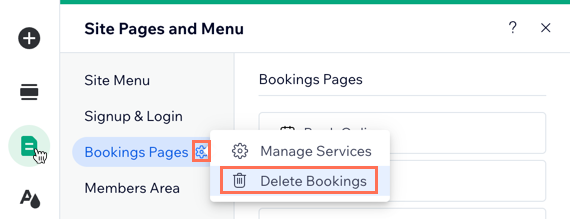
Click Delete to confirm.
Studio Editor
Click Pages

on the left side of the editor.
Hover over Bookings Pages and click the More Actions icon

.
Click Delete Bookings.
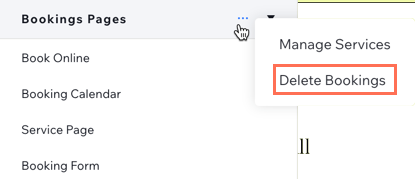
Click Delete to confirm.
Wix Harmony Editor
Click the Page dropdown at the top left of the page.
(In the Site Pages panel) Click the More Actions icon

next to Bookings Pages.
Click Delete Bookings.
Click Delete to confirm.
This article is credited to the Wix team - https://support.wix.com/ and we thank them for that!