Give your clients more control over their bookings by allowing them to view, reschedule, or cancel sessions online. Both site members and non-members can manage their bookings directly from your site without needing to contact you.
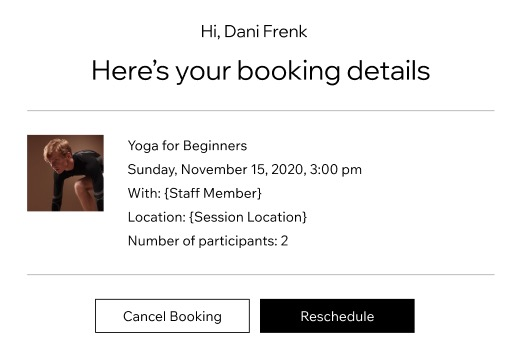
Each client receives a unique link to their booking, where they can view booking details and cancel or reschedule sessions according to your booking policy.
Allowing clients to cancel / reschedule bookings
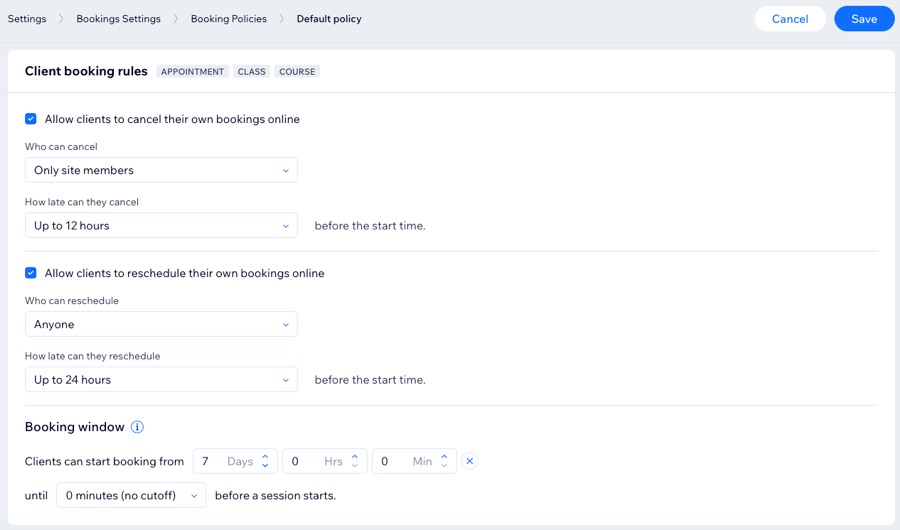
Set your client booking rules by choosing who can cancel or reschedule bookings, how late clients can make changes, and when booking availability opens and closes.
To allow clients to cancel / reschedule a booking:
Go to Booking Settings in your site's dashboard.
Scroll down and click Booking policies.
Choose the relevant option:
Add a new policy: Click + Add a New Policy.
Edit an existing policy: Click the More Actions icon

next to the relevant policy, then click Edit.
Scroll down to Client booking rules and set the relevant rules:
Allow clients to cancel their own bookings online
Select the checkbox next to Allow clients to cancel their own bookings online.
Click the Who can cancel dropdown and select the relevant option (Anyone / Only site members).
Click the How late can they cancel dropdown and select a fixed timeframe (Anytime / a fixed timeframe / Custom).
Set the Booking window:
Click the Clients can start booking from dropdown and select the relevant option.
(Optional) Click the until dropdown and select the cut-off time before a session starts.
Click Save.
Allow clients to reschedule their own bookings online
Select the checkbox next to Allow clients to reschedule their own bookings online.
Click the Who can reschedule dropdown and select the relevant option (Anyone / Only site members).
Click the How late can they reschedule dropdown and select a fixed timeframe (Anytime / a fixed timeframe / Custom).
Set the Booking window:
Click the Clients can start booking from dropdown and select the relevant option.
(Optional) Click the until dropdown and select the cut-off time before a session starts.
When ready, click Save.
FAQs
Click a question below to learn more about cancelling or rescheduling a booking session.
Can clients cancel or reschedule bookings from the members area?
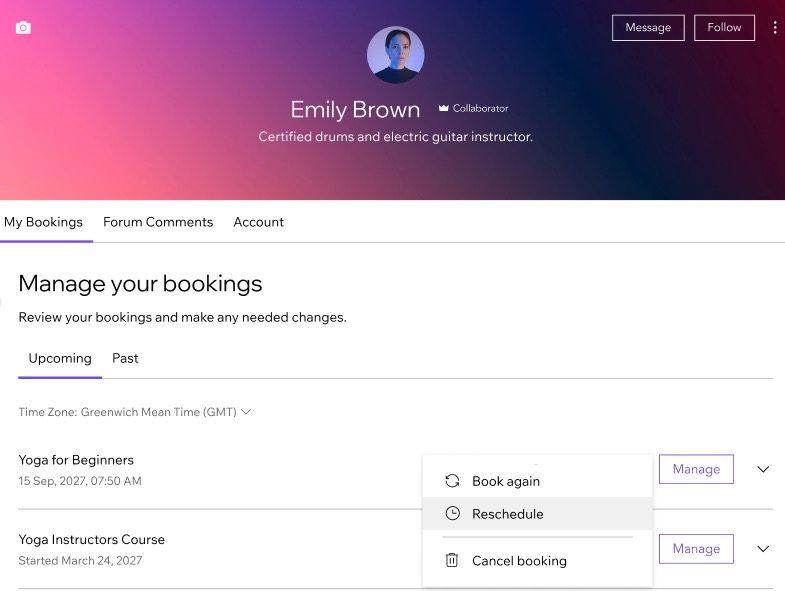
Yes. When your site has a members area, clients can log in to their personal My Bookings page and make changes to their bookings. From there, they can view upcoming and past bookings. For upcoming bookings, they can click Reschedule or Cancel booking to manage bookings without contacting you directly.
Do non-members need to contact me to cancel or reschedule a booking?
No. Non-members can manage their bookings themselves using the personal booking link in their email. The link opens a secure page where they can view the booking details and cancel or reschedule based on your booking policy.
Why can’t my clients reschedule certain sessions themselves?
Clients cannot reschedule sessions in 2 cases:
The session was paid for with different price options (e.g. a mix of drop-in and plan credits).
The service is set to Manually approve or decline booking requests.
Note: If the session is part of a multi-appointment booking, it cannot be modified for non-member clients.
How can I reduce last-minute cancellations and no-shows?
To avoid last-minute cancellations, set a cancellation policy that includes cancellation and no-show fees.
Can clients manage their bookings from the Wix mobile apps?
Yes. Clients can also book, reschedule, or cancel attendance at their upcoming sessions using the Wix mobile apps (like Spaces by Wix & Fit by Wix).
What happens to a pricing plan session when a client cancels?
When clients cancel sessions booked using pricing plans, the session is added back into their pricing plan allowance.
How can clients manage their booking?
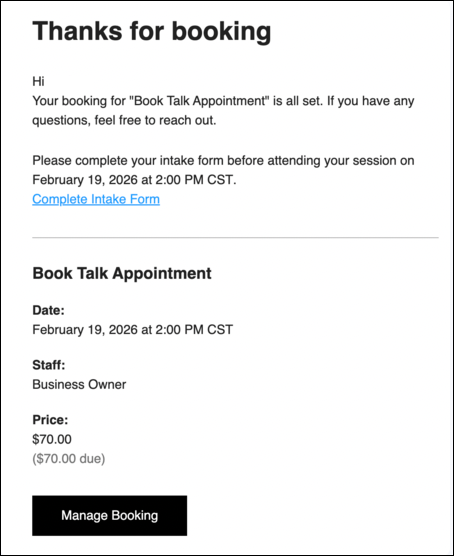
Clients can manage their bookings via the 'Manage Booking' button in all booking confirmation emails, session reminders, and session change notifications.
Non-members: When they click the button, they’re taken to a secure page where they can view, cancel, or reschedule their booking.
Members: When they click the button, they’re directed to their booking area within their account.
Why don't I see the 'Manage Booking' button in my email?
If your automation was edited before February 2026, the 'Manage Booking' button does not appear automatically in those emails.
To include the button, you can:
Revert the automation to default.
Add a button with the dynamic parameter "Manage booking link".
This article is credited to the Wix team - https://support.wix.com/ and we thank them for that!