Adding an FAQ to a post can give your readers quick answers to their most common questions about a topic. You can create an FAQ by adding a collapsible list to your posts from your site's dashboard or your live site.
Note:
It is not possible to add a collapsible list to a post in the Wix app.
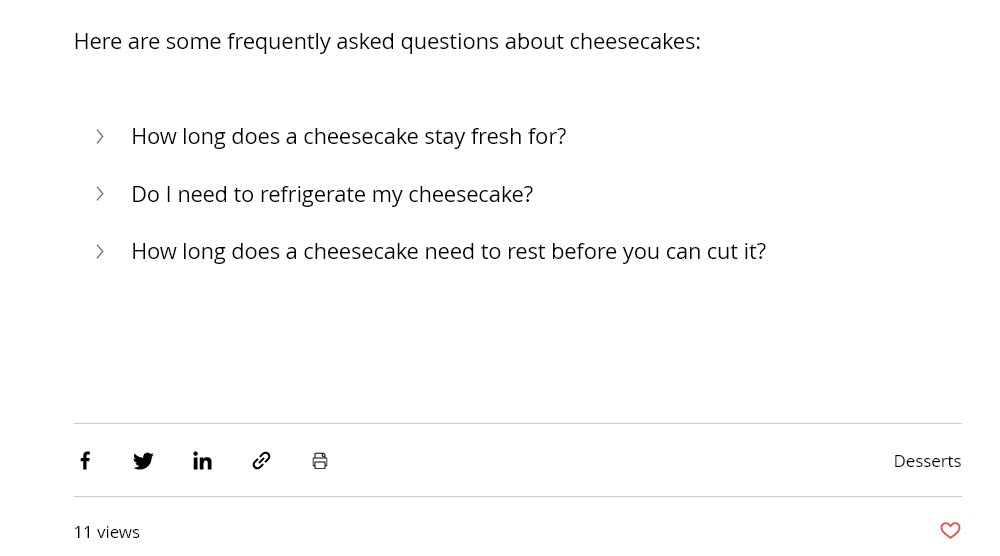
Creating an FAQ for a post in your dashboard
You can create an FAQ for your post in the Blog section of your site's dashboard. Add a collapsible list to your post, then enter the questions and answers that you want to include.
To create an FAQ:
Go to Blog in your site's dashboard.
Click Posts.
Hover over the relevant post and click Edit.
Click the Add icon

beside the section where you want to add the FAQ.
Select Expandable List under Elements.
Enter your first question and answer in the fields.
Click + Add another expandable item to add another question and answer.
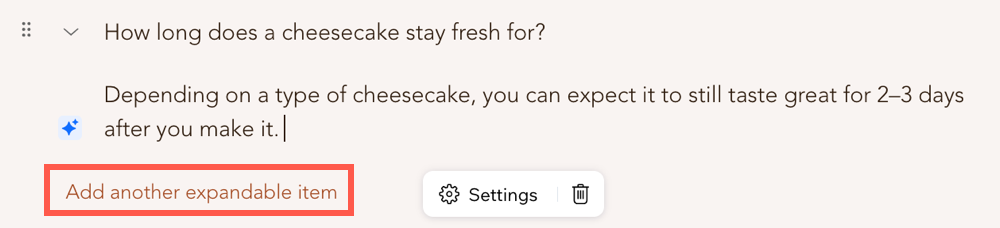
Repeat step 6 for as many questions and answers as you need to add.
Click Settings.
Customize your collapsible list using these options:
How many items are expanded by default?: Select to display all of your answers expanded by default, only the first answer expanded, or none of your answers expanded.
Expand one item at a time: Enable this toggle to automatically close an answer when you open another answer.
Display: Select a right-to-left or left-to-right direction for the text of your FAQ.
Click Save.
Click Publish.
Creating an FAQ for a post on your live site
You can create an FAQ for your post by editing it on your live site. Add a collapsible list to your post, then enter the questions and answers that you want to include.
To create an FAQ:
Log in to your live site using the email address associated with your Wix account.
Go to the page of the post that you want to edit.
Click the More Actions icon

on the post.
Select Edit Post.
Click the Add icon
beside the section where you want to add the FAQ.
Click the Expandable List icon

.
Enter your first question and answer in the fields.
Click + Add another expandable item to add another question and answer.
Repeat step 6 for as many questions and answers as you need to add.
Click Settings.
Customize your collapsible list using these options:
How many items are expanded by default?: Select to display all of your answers expanded by default, only the first answer expanded, or none of your answers expanded.
Expand one item at a time: Enable this toggle to automatically close an answer when you open another answer.
Display: Select a right-to-left or left-to-right direction for the text of your FAQ.
Click Save.
Click Publish Changes.
This article is credited to the Wix team - https://support.wix.com/ and we thank them for that!