Categories are a great way to sort your blog into different topics and give your readers a general idea what your blog posts are about. You can add a category menu that provides extra structure and organization to the various categories in your blog.
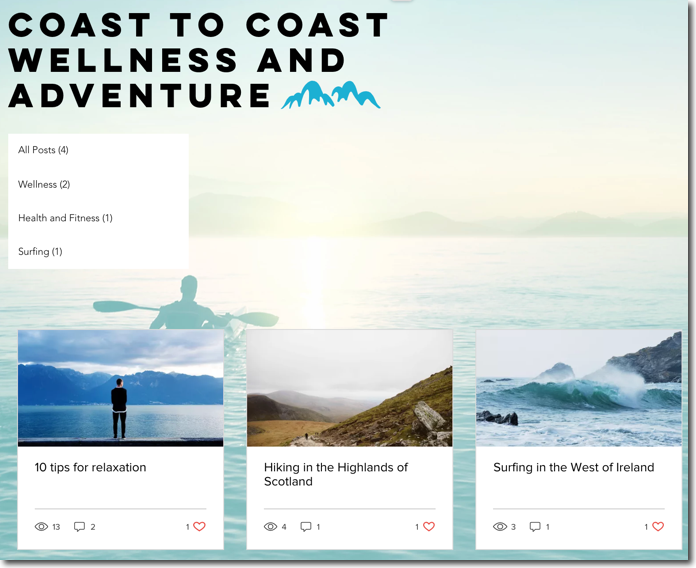
To add and customize the category menu:
Wix Editor
Go to the page you want the category menu to appear on.
Click Add Elements

on the left side of the editor.
Click Blog.
Select the Category Menu element.
Drag it to position it on the page.
Click the element in your editor.
Click Settings.
Click the tabs on the left to customize the category menu:
Display
Customize the category display:
Click the Show All Posts toggle to show all posts in the category widget.
Click the Show number of posts toggle to display the number of posts in the category widget.
Layout
Customize the following:
Text alignment: Choose where you would like the text to appear:
Left: The text appears on the left in the widget.
Center: The text appears in the center of the widget.
Right: The text appears on the right in the widget.
Text padding (left & right): Drag the slider to adjust the amount of padding at the sides of the widget.
Text padding (top & bottom): Drag the slider to adjust the amount of padding at the top and bottom of the widget.
Design
Customize the following:
Font style & color: Click the Expand icon

to select a font style and click the color box to select a font color.
Background color: Click the color box to choose a background color and drag the slider to adjust the level of color.
Divider opacity & color: Click the color box to choose the divider color and drag the slider to adjust the level of opacity.
Divider width: Drag the slider to adjust the width of the divider.
Border opacity and color: Click the color box to choose the border color and drag the slider to adjust the level of opacity.
Border width: Drag the slider to adjust the width of the border.
Corner Radius: Drag the slider to adjust the corner radius.
Studio Editor
Go to the page you want the Category Menu to appear on.
Click Add Elements

on the left side of the editor.
Click Blog.
Select the Category Menu element.
Drag it to position it on the page.
Click the element in your editor.
Click Settings.
Click the tabs on the left to customize the category menu:
Display
Customize the category display:
Click the Show All Posts toggle to show all posts in the category widget.
Click the Show number of posts toggle to display the number of posts in the category widget.
Layout
Customize the following:
Text alignment: Choose where you would like the text to appear:
Left: The text appears on the left in the widget.
Center: The text appears in the center of the widget.
Right: The text appears on the right in the widget.
Text padding (left & right): Drag the slider to adjust the amount of padding at the sides of the widget.
Text padding (top & bottom): Drag the slider to adjust the amount of padding at the top and bottom of the widget.
Design
Customize the following:
Font style & color: Click the Expand icon
to select a font style and click the color box to select a font color.
Background color: Click the color box to choose a background color and drag the slider to adjust the level of color.
Divider opacity & color: Click the color box to choose the divider color and drag the slider to adjust the level of opacity.
Divider width: Drag the slider to adjust the width of the divider.
Border opacity and color: Click the color box to choose the border color and drag the slider to adjust the level of opacity.
Border width: Drag the slider to adjust the width of the border.
Corner Radius: Drag the slider to adjust the corner radius.
Tip:
You can also add an archive menu to your blog feed.
This article is credited to the Wix team - https://support.wix.com/ and we thank them for that!