Anchors are links that you can add to any piece of text to help visitors find the content they want more efficiently. Adding anchors to a blog post is a great way to add some structure to posts that contain a lot of content.
Ways to use anchors:
A great way to use anchors is to add some text that you can link at the top of your post. This means your visitors can open the post, find a short snippet about the piece of content they're most interested in reading, click on the linked text and get redirected to the content they want.
You can also use anchors to create a table of contents.
To add anchors to a blog post:
Go to your blog in your site dashboard.
Choose to create a new post or edit an existing post.
Add the relevant text to the post.
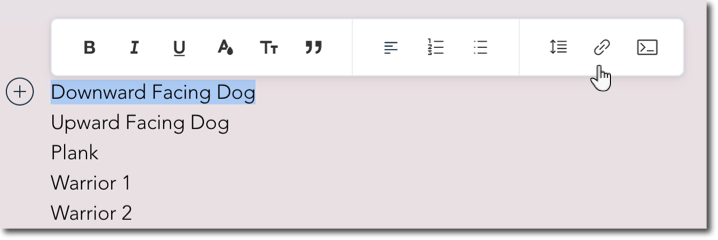
Highlight the text that you want to use as an anchor.
Click the Link icon

on the toolbar.
Select Section.
Choose the section that you want the anchor to direct to.
Click Save.
Unlinking anchors:
You can unlink anchors by clicking on the link and clicking the Unlink icon

.
This article is credited to the Wix team - https://support.wix.com/ and we thank them for that!