Your blog web address (URL) is how visitors and search engines find and share your content online. Your main Blog page has its own URL that shows your full blog, while each individual blog post also has a unique URL.
Having clear and consistent URLs makes it easier for readers to discover your posts and helps improve your site’s search ranking.
Understanding Blog URLs
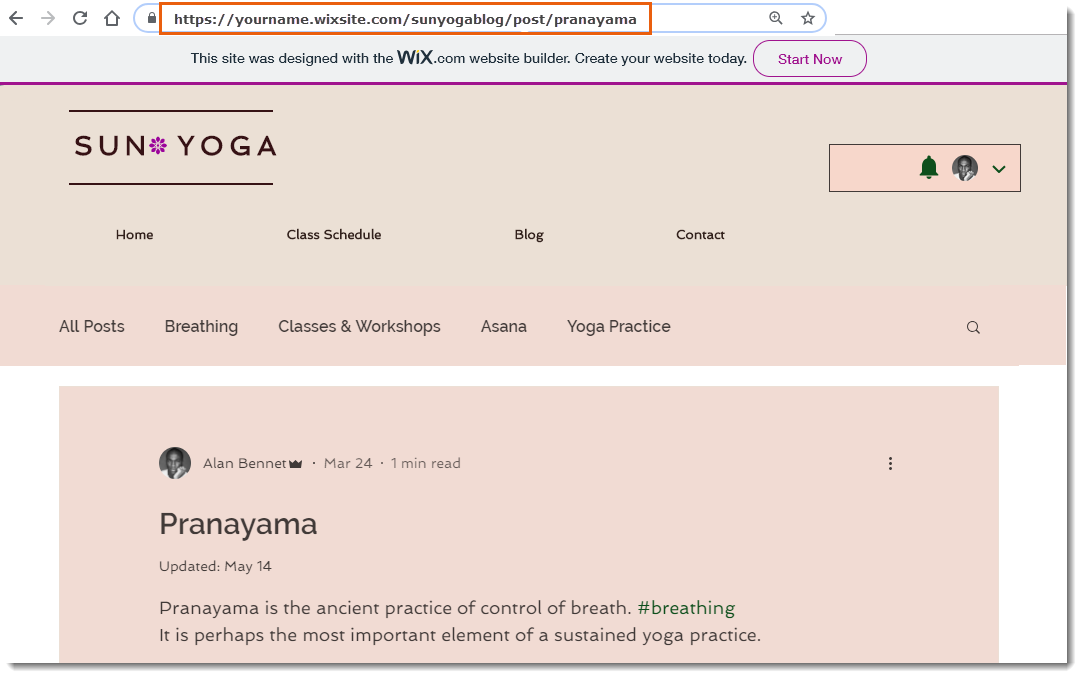
Every new post you publish gets a unique URL, usually made up of several different parts that when combined they make a URL that directs to a specific part of your site.
Main blog page URL
Let's think about the URL that brings you directly to your main blog page, as it's different to the URL that takes you to a blog post.
Here's an example URL: myaccount.wixsite.com/my-site-2/blog
The table below gives a full breakdown of the URL in more detail.
URL | Part | Meaning |
myaccount | subdomain | The user of a Wix account |
wixsite.com | domain | A free domain hosted on Wix |
mysite-2/blog | path segment | Parts of your URL that direct you to a specific place |
blog | URL slug | The very last part of the URL. It's also part of your path segment. You can customize this part. |
Post page URL
The URL for your post page doesn't navigate from your main blog page, it becomes a new URL in itself.
Here's an example URL: myaccount.wixsite.com/my-site-2/post/post-title
The table below gives a full breakdown of the URL in more detail.
URL | Part | Meaning |
myaccount | subdomain | The user of a Wix account |
wixsite.com | domain | A free domain hosted on Wix |
mysite-2/post/post-title | path segment | Parts of your URL that direct you to a specific place. e.g. a blog post |
post-title | URL slug | The very last part of the URL. It's also part of your path segment. You can customize this part. |
Tips for blog post URLs:
Keep your URLs short and focused on the main topic.
Use only lowercase letters, numbers, and hyphens in your slug to ensure all browsers recognize the link.
Choose descriptive keywords that match your post’s topic to help with search engine optimization (SEO).
Avoid using special characters or spaces, as these may not display correctly in browsers.
Review your post’s URL before publishing to make sure it looks clean and easy to read.
If you update a blog post’s URL after publishing, update any internal links pointing to that post so visitors don’t see broken links.
Customizing your Blog page URL
Changing your main B log page URL lets you control how your blog address appears in your site's web address. You can change the part of the URL that appears after your domain name for your main Blog page.
For example a free site URL for your main Blog page could look like this:
myaccount.wixsite.com/my-site-2/blog
To customize your Blog page URL:
Wix Editor
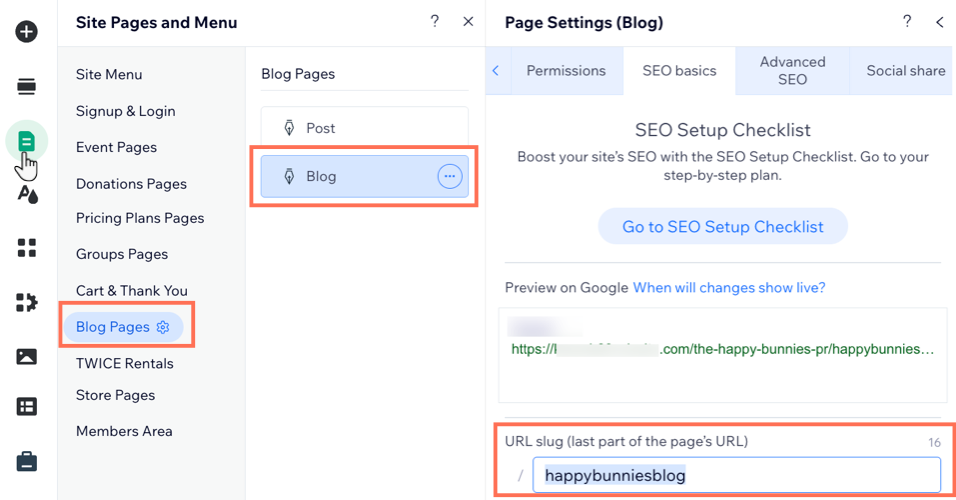
Click Pages & Menu

on the left side of the editor.
Click Blog Pages.
Click the More Actions icon

next to Blog.
Click SEO basics.
Enter your desired path name for your blog in the URL slug field.
Studio Editor
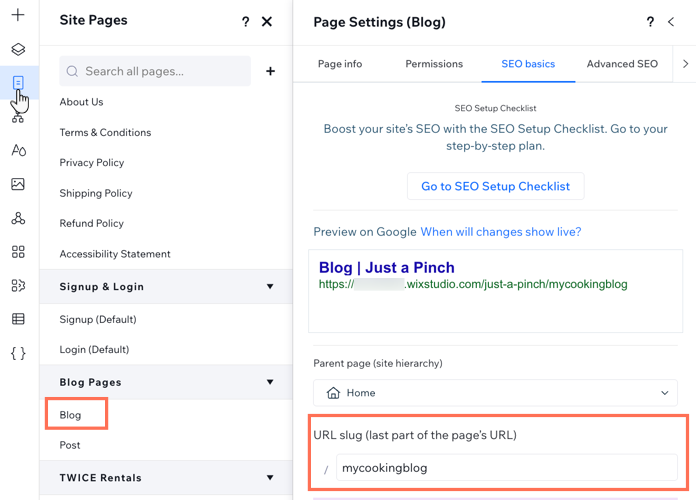
Click Pages

on the left side of the editor.
Click the More Actions icon
next to Blog.
Click SEO basics.
Enter your desired path name for your blog in the URL slug field.
Wix Harmony Editor
Click the Page dropdown at the top left of the page.
(In the Site Pages panel) Find the Blog page under Blog Pages.
Tip: Jump to the page you need by clicking the dropdown next to Site Pages and selecting Blog Pages.
Hover over the Blog page and click the More Actions icon

.
Click Settings.
Enter your desired path name for your blog in the Page URL (slug) field.
Customizing your Post page URL
Changing your blog post URL lets you decide how each post’s address appears on your site.
For example, a free site URL for the Blog Post page could look like this:
myaccount.wixsite.com/my-site-2/post/post-title
To customize your Post page URL:
Go to Blog in your site's dashboard.
Click Edit next to the relevant post.
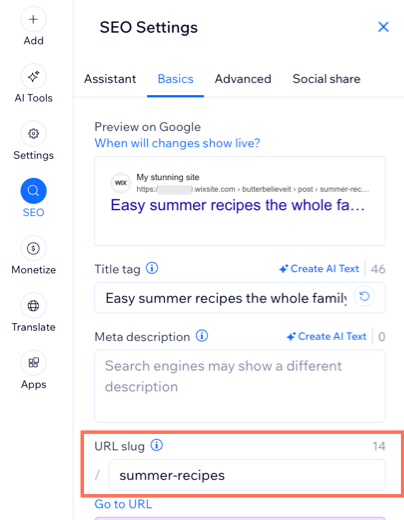
Click the SEO tab in the panel on the left.
Click the Basics tab.
Enter your desired path name for your post in the URL slug field.
FAQs
Click a question below to learn more about blog URLs.
Do I need to update my blog and post page URLs after transferring my domain?
No. You do not need to manually update your blog page URLs after transferring your domain. This happens automatically.
What's the difference between Premium site and free site URLs?
A free site has a Wix-branded URL, whereas a site connected to a Premium plan has a custom URL. Custom domains help your blog appear more professional and are easier for visitors to remember and share. For example:
Free site: myaccount.wixsite.com/my-site-2/post/post-title
Premium site: yourdomain.com/post/post-title
Can I change my free site URL?
Yes. You don't need a Premium plan to personalize your site URL. You can change your free Wix URL by changing your site URL prefix or site address.
How can I find URLs to specific blog posts?
To find the web address (URL) of one of your blog posts, access your live site, click the relevant blog post, and copy the address from your browser's address bar.

Can I rename my blog URL slug and post URL slug to the same thing?
No. Your blog URL slug and your post URL slug cannot be the same word. Using the same word for both slugs breaks the URL, resulting in a broken link on your site.
Can I remove "post" from my blog post URL?
It is not possible to remove the "post" prefix entirely, but you can rename it. Wix Blog has two base URL structures:
Blog feed page: www.sitename.com/blog
Post page: www.sitename.com/post/post-title
You can edit both the "blog" and "post" prefixes to a name of your choice. However, the two prefixes cannot be set to the same value — for example, setting both to "blog" to achieve www.sitename.com/blog/post-title is not possible.
This article is credited to the Wix team - https://support.wix.com/ and we thank them for that!