If you are experiencing issues when customizing a formula field, see our solutions below.
Click an error message below to find out how to resolve it:
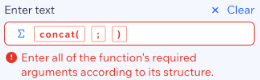
Enter all of the function’s required arguments according to its structure
You will see this error message when one or more arguments are missing from the function.
To fix this, check the function structure and add any missing arguments. Once all arguments have been added correctly, the error symbol will disappear.
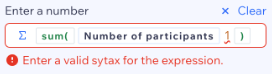
Enter a valid syntax for the expression
Syntax refers to the structure and rules of the expression, like properly placed punctuation and symbols.
You will see this error message when the function structure is broken. To fix this, make sure all semi-colons and brackets are where they need to be. Once the expression's structure is fixed, the error symbol will disappear.
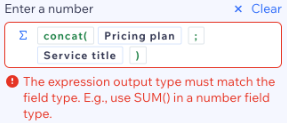
The expression output type must match the field type
Each field selected has an expected output type (e.g. number, text). Using the wrong type can result in errors.
You will see this error message when the field type is not the output type that is expected in the expression.
To fix this, make sure to adjust the expressions to match the expected field types. Once the expressions are fixed, the error symbol will disappear.
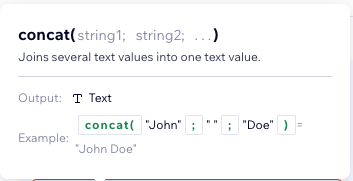
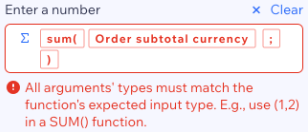
All arguments’ type must match the functions’ expected input type
You will see this error message when one of the provided arguments is not from the type that the function expects to get.
To fix this, replace the argument or try to cast it with casting functions to the expected type. Once all arguments match the expected function types, the error symbol will disappear.
Note: To 'cast' means to convert data into a different type. For example, you can use a casting function to turn text into a number.
Invalid date format
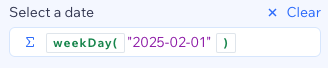
Dates must be formatted as 'Year-month-date' (e.g. 2023-10-25).
You will see this error message when you manually added a date that does not match the required date format.
To fix this, use the date picker to select a date which will automatically add the date in the correct format. Once the date has been adjusted to meet the required format, the error symbol will disappear.
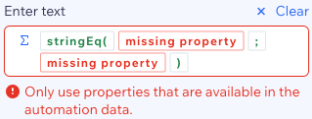
Only use properties that are available in the automation data
You will see this error message when you select a property that is no longer available in the automation data. For example, if you selected a property from a trigger but later replaced the trigger, the original properties may no longer exist.
To fix this, replace the unavailable property with a valid one from the current automation data. Once new properties have been selected, the error symbol will disappear.
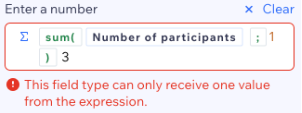
This field type can only receive one value from the expression
You will see this error message when adding more than one expression separated only by spaces.
To fix this, adjust the expression so that there is only one value as an input. Once the expression has been fixed, the error symbol will disappear.
What information should I include if I need to reach out for assistance?
For us to best assist you, it helps to have the following information ready:
The name or URL of your Wix site
The name and version of the web browser you're using
The name and version of your computer's operating system
A screenshot of the error
This article is credited to the Wix team - https://support.wix.com/ and we thank them for that!