Wix Analytics People reports give you an in-depth analysis of your site visitors, members and customers. Understand who visits your site and get insights to questions such as, "How many customers do I have compared to this time last year?" and "Who are my top customers?".
How to access your People reports:
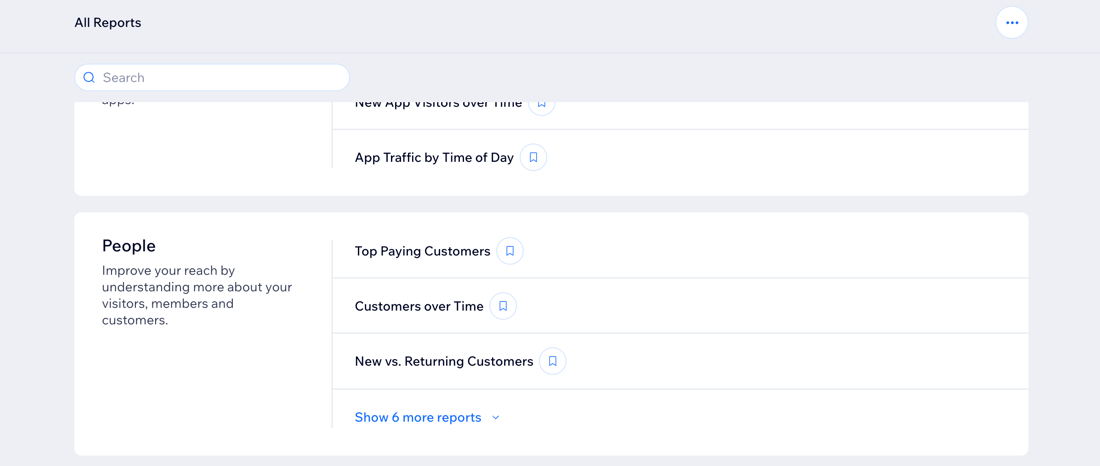
Go to All Reports in your site's dashboard and scroll down to the People section.
Note:
The measures available in your People reports depend on the Wix apps you've installed.
Types of People reports
Use the different types of People reports available to gain insights into your customers and leads. These reports help you track metrics such as top paying customers, customer growth over time, new vs. returning customers, and more.
Click a report type to learn more about it.
Top paying customers
See which customers ordered the most on your site as well as how many total orders they have.
Use this report to:
Filter your top customers by metrics like country, or whether they are new or returning customers
See how many customers used coupons when ordering to see how effective your marketing coupons are for site orders.
Tip: Consider adding a loyalty program to your site to reward your returning customers and incentivize them.
Customers over time
See how many customers make purchases on a specific day or month. Track who has paid for goods, services, classes, or subscriptions on your site.
Use this report to:
Learn how many customers you gained over a specific period of time.
Understand if there are certain times in which you are gaining more customers (e.g. holidays or special events).
New vs. returning customers
See a breakdown of new customers/visitors to your site vs. customers who have purchased or visited your site before.
Use this report to:
View a pie chart of the split between your new and returning customers.
Filter by total orders and sales to see if new or returning customers are purchasing more.
Contacts over time
See how many new contacts were added to your site over a certain time period. Contacts can either be added manually or by an activity a visitor performed, such as submitting a contact form or registering for your newsletter.
Use this report to:
Learn how many contacts you gained over a specific period of time.
Understand the split between contacts who are site members (signed up for your site) and contacts who ordered something.
Paying subscribers over time
See how many subscribers you receive over specific days, weeks or month. Paying subscribers refer to people who have purchased something such as an order through Wix Stores, a paid plan with Pricing Plans, or have been sent an invoice.
Use this report to:
Monitor subscription purchases over time, through paid plans, Wix Stores, and invoices.
Compare subscriptions purchases to previous periods.
Note: The report shows the first transaction in the subscription only and does not include recurring payments.
Form leads
This report provides insights into potential customers who submitted a form on your site.
Use this report to:
View the details (name, email, phone number) of each lead.
Understand which traffic sources your leads are coming from.
Identify which traffic sources are most effective.
Note: This report includes form submission data for new and old Wix Forms.
FAQs
Click a question to learn more about Wix Analytics People reports.
When does someone become a new contact in my 'contacts over time' report?
Site visitors become contacts when they perform an activity on your site and enter information. For example, they can submit a contact form, register for an event or make a store order, sign up for a newsletter, or become a site member. You can also add contacts manually.
What is the difference between a lead and a customer?
A lead is any contact on your site that hasn't recently made a purchase. They've taken an action before (e.g. registered for a newsletter, filled out a contact form) but haven't directly purchased an item.
In the 'leads by source' report, a contact might be both a lead and a customer. This is because depending on the timeframe you've selected a lead could have since made a purchase and become a customer. During the specific period you're viewing, however, they are still counted as leads.
What happened to the 'Leads by source' and 'All leads' reports?
These two reports have been removed and replaced by the 'Form leads' report. If you were previously subscribed to either of the old reports, you will now receive the 'Form leads' report instead.
The definition of leads in the report glossary changed to "people who submitted a form on your site", therefore the new 'Form leads' report covers the relevant data.
Why does the Traffic Overview show data while People Reports shows no data?
People reports only show data for visitors who are recognized as customers, site members, or existing contacts. The Traffic Overview (and Traffic reports) includes all site visitors, including people who are not customers, site members, or contacts.
This means that if no customers, site members, or existing contacts visited your site in the selected time period, People reports will show 0.
This article is credited to the Wix team - https://support.wix.com/ and we thank them for that!