The Wix Analytics Marketing reports give you an in-depth look at how your marketing efforts are impacting you business.
Analyze your outreach campaigns such as email marketing campaigns and paid ad campaigns and see how they compare to other traffic sources such as Facebook. You can also view which marketing sources are bringing the most attention to your site.
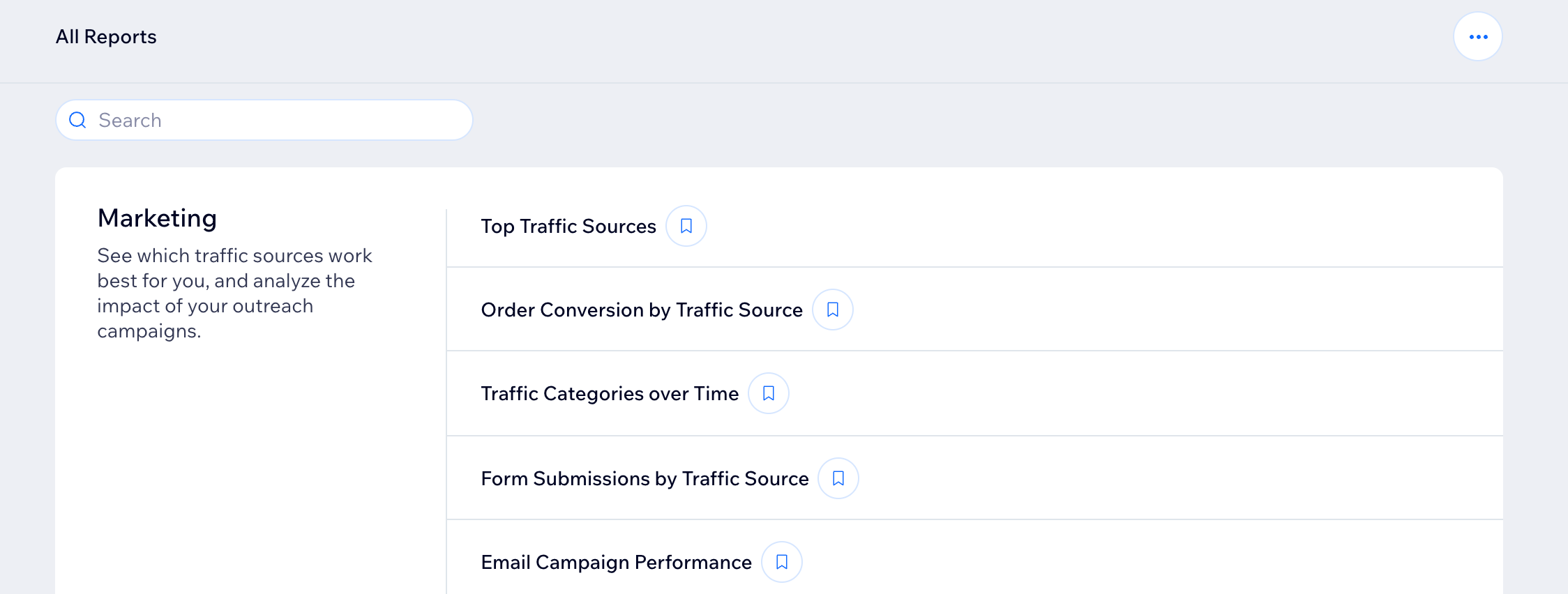
How to access your marketing reports:
Go to All Reports in your site's dashboard and scroll down to the Marketing section. You can also check out the Marketing Overview to get a snapshot of your marketing efforts across your business.
Types of marketing reports
Understand the different types of marketing reports available in Wix Analytics to gain insights into your site's performance and marketing efforts. Each report provides specific data that helps you understand traffic sources, ad and email campaign performance, and more.
Click a report type below to learn more about it.
Top Traffic Sources
Use the top traffic sources report to see where your site visitors are coming from. Your site traffic data is grouped by referring sites and categories (Google, Facebook) as well as any marketing campaign sources.
Use this report to:
Find out how many visitors are new to your site and where they are located.
Compare your site traffic by source to the previous period.
Discover what marketing campaigns are getting the most traffic.
Note: When a site owner logs into their Wix account, any visits using the same device and browser won't be counted in this report.
Order Conversion by Traffic Source
Use the order conversion by traffic source report to find out which referring sites and marketing campaigns generate the most order conversions.
Use this report to:
Discover where geographically your marketing campaigns are the most effective.
Learn which keywords your audience is responding to.
Note: When a site owner logs in to their Wix account, any visits using the same device and browser won't be counted in this report.
Traffic Categories over Time
The traffic categories over time report shows you which traffic sources (sites that people navigate to your site from) are bringing you the most sales over a specific period of time. The report is separated into organic search and organic social.
Form Submissions by Traffic Source
The form submissions by traffic source report shows you what top traffic sources (e.g. email marketing, Facebook, Instagram) created the most form submissions for your site.
Use this report to:
Compare different traffic sources to see where people are submitting forms.
Analyze different types of traffic sources with forms (organic search, organic social etc).
Add your most important forms where people are searching (e.g. if you have high Instagram traffic, make sure you include crucial information there).
Email Campaign Performance
The email campaign performance report lets you see the spread of data from all your email marketing campaigns and help you make decisions as you compare them.
Use this report to:
Analyze your email open and click rates.
See how many sales your campaigns have generated within the last 30 days.
Click-to Contact Rate by Traffic Source
Use this report to find out which traffic sources (e.g. Google, Facebook) drive visitors to contact you. For example, click-to-contact includes site sessions where a visitor went on to contact you via WhatsApp, phone or email.
Note: This report does not include click data on the following:
Phone numbers that are formatted as plain text. To make a phone number trackable, it must be in a clickable link.
Wix Business Phone Numbers. You can track these calls from your inbox.
Email Campaign Engagement over Time
This report allows you to combine all your results from email marketing campaigns and see how a certain metric has changed over time. Select a time period and then choose which measure you want to track.
Some of the metrics you can filter for include:
Unique opens
Unique clicks
Bounced
Unsubscribed
Paid Ad Campaigns over Time
Use this report to analyze the performance of paid ad campaigns over different time periods. If you have no paid campaigns running, you will not see data in this report.
Top Paid Ad Campaigns
Use this report to analyze which paid ads are the most effective. If you have no paid campaigns running, you will not see data in this report.
Email Campaign Clicks
Use this report to see how the links in your email campaigns are performing. You can view both unique link clicks and total clicks.
Note: If an image and a button in a single campaign lead to the same URL, you will see one combined number of clicks on the report since clicks are tracked per link. However, if you use the same URL in multiple campaigns, the report will show multiple clicks since the clicks came from different campaigns.
Want to customize a report?
You can customize the data you're viewing and the way it's displayed. You can also save the views you want to return to later. Learn more about customizing your report.
FAQs
Click a question below to learn more about your Wix Analytics marketing reports.
What is a traffic source?
A traffic source is the site that people navigate to your site from. Examples of traffic sources include facebook.com, medium.com, twitter.com.
A traffic source URL refers to the specific URL that people are navigating from.
Why do I see data differences between my Wix Analytics Marketing reports and reports from other analytics platforms?
There are a few reasons you could see data differences on other platforms including:
Visitors that don’t consent to site cookies won’t have their data collected.
The data in your Wix Analytics Reports is based on a 30 day period. The time period used to collect Attribution Model data varies in other analytical platforms, such as Facebook Ads, which uses a 28 day period.
The date and time from which the data collection period starts and ends can vary. Google Analytics and Facebook Ads 30 or 28 day period can be initiated from a First Interaction which differs from the data collected by Wix Analytics.
What is an attribution model?
Attribution models are customer touchpoints, showing which marketing campaigns and social media platforms are used to find and then revisit your site in a 30 day period.
The available attribution models you can filter for in these reports are:
First Interaction: The first marketing source used by a visitor that eventually converts.
For example: A visitor first finds your site by clicking a link in a Google Ad. The Google Ad is the First Interaction. From the First Interaction, the 30 day period for collecting visitor interaction data begins.
Last Interaction: The last marketing source a visitor interacted with.
For example: A week after the First Interaction, the visitor returns to your site by clicking on a link in a marketing email. Two weeks later, they visit your site again through a Facebook ad. The visitor doesn’t return to your site again within the 30 day period. The Facebook ad is considered the Last Interaction.
Last Non-Direct Click: The last marketing source used before a visitor converts.
For example: A user clicks on your Facebook ad and is directed to your site. They visit your site again the next day without clicking on the Facebook ad, but by Googling your site or visiting your site directly. As the Facebook ad was the last marketing source used, it is the Last Non-Direct Attribution Model.
Last Wix FB Ads Click: The last Wix FB ad the user clicked before converting.
For example: A user clicks on your Facebook ad (that was created with Wix) and is directed to your site. They visit your site again in the next days without clicking on the Facebook ad, but by Googling your site or visiting your site directly, and make a purchase. The Wix Facebook Ad is accounted for the conversion.
Note: this model applies only for Wix FB Ads users.
This article is credited to the Wix team - https://support.wix.com/ and we thank them for that!