Important:
Wix AI Site Chat is no longer available to install on new sites. Wix Smart Chat is replacing it as the new AI and manual chat solution. Learn more about Wix Smart Chat.
Wix AI Site Chat provides a customized on-site chat interface that lets site visitors engage in natural conversations with AI, access support with ease, and more. If you no longer wish to provide this service, you can delete the chat from your site.
Deleting the AI chat from your site will uninstall the app from your site dashboard. Even after uninstalling it, you'll still have access to all previous chats through Wix Inbox.
Not sure you want to uninstall the AI Site Chat?
If you're unsure about permanently uninstalling Wix AI Site Chat, read about alternative solutions in the FAQ section below.
Deleting Wix AI Site Chat from your site
To remove the AI Site Chat completely, all you need to do is delete the chat widget from your editor and then publish the site.
To delete Wix AI Site Chat:
Wix Editor
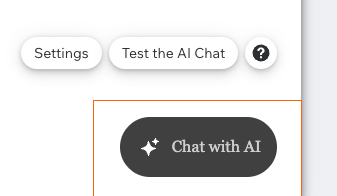
Select the chat widget in your editor.
Tip: It's usually located on the bottom right or left of the page.
Press Delete on your keyboard.
Click Publish to make the changes go live.
Studio Editor
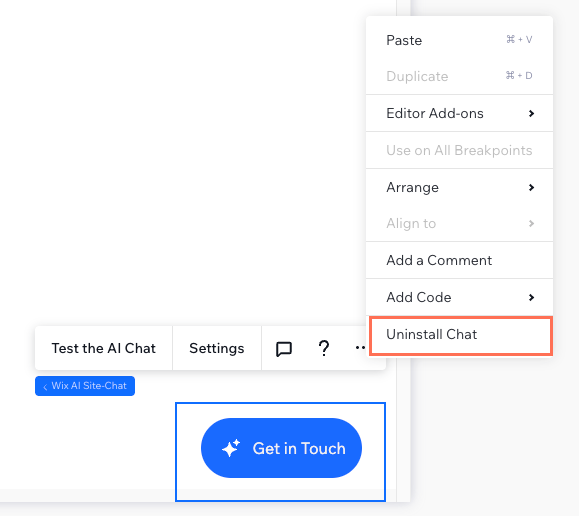
Select the chat widget in your editor.
Tip: It's usually located on the bottom right or left of the page.
Click the More Actions

icon and click Uninstall Chat.
Click Publish to make the changes go live.
FAQs
Click a question to learn more about deleting Wix AI Site Chat.
I don't want to uninstall the AI Site Chat, but do I want to limit the chat's visibility. What are my options?
If you're unsure about uninstalling Wix AI Site Chat, there are alternative solutions you can try:
Hide the chat widget from your site: Temporarily deactivate the AI chat by clicking the toggle at the top right of the AI Site Chat dashboard.

Manage your chat hours: Customize the online chat hours and decide what happens when the chat is offline. For example, you can set a limited schedule for when the chat is online and collect leads with a contact form when the chat is offline.
Can I show the AI Site Chat only on desktop?
No, you cannot delete or hide the chat widget from your mobile site only. Deleting the chat widget from your site's mobile version removes it from all screen sizes.
Can I reinstall the AI Site Chat after deleting it?
Yes, you can reinstall Wix AI Site Chat at any time through the Wix App Market. Learn how to install Wix AI Site Chat.
Note: Your dashboard settings (e.g. your chat hours and knowledge rules) remain saved, but the chat widget's visual settings (e.g. text and colors) will reset to the default settings.
Does deleting the AI Site Chat delete all my past chats?
No, your chat history is stored in Wix Inbox and remains accessible after uninstalling Wix AI Site Chat.
This article is credited to the Wix team - https://support.wix.com/ and we thank them for that!