The log data (or bot log report) for your site contains information about all the requests your site gets from visitors and search engine bots. A request represents an attempt to view a specific page, image, document, or any other type of file on your site.
It also records other request data such as:
The date and time of each request
The response the request got (successful or unsuccessful)
The page that was requested
Log Data Reports in Wix Analytics
You can use Wix Analytics SEO Reports to view useful information from your site's log data.
The Bot Traffic over Time, Bot Traffic by Page, and Response Status over Time reports focus on search engine bots only and do not include site visitors. This lets you see how bots behave when they visit your site.
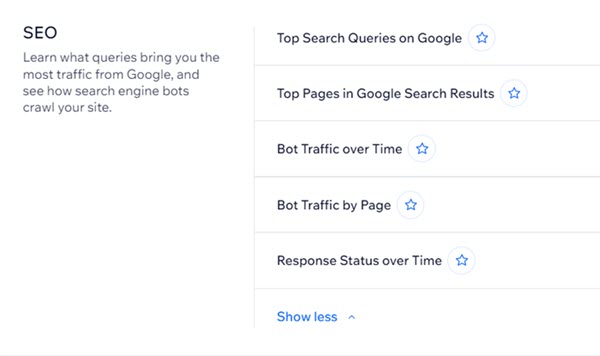
You can use these reports to help you optimize your site for SEO by:
Understanding the volume and frequency of requests to your pages
Identifying pages with issues such as 404 errors or 500 errors
Locating pages that bots are not crawling often
Identifying pages that bots are crawling too often
Using Log Data Reports to Optimize Your Site
You can use each of the reports to analyze a different aspect of your site's SEO and identify issues and opportunities.
Bot Traffic over Time
This report lets you see an overview of which bots crawl your site and how often they crawl it.
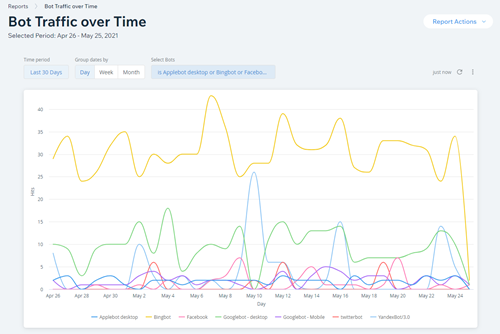
You can use this information to:
Understand how specific bots interact with your site by selecting them in the Line Chart Split View
Identify potential issues with your site using Advanced Filters.
Make decisions about updating your site pages to manage your crawl budget
Learn more about the Bot Traffic over Time report
Bot Traffic by Page
This report lets you see which pages on your site are crawled by bots. You can use the report to identify pages that are crawled too often or not often enough.
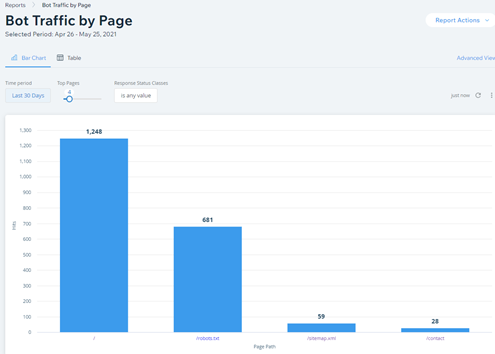
Select the Bar Chart view or Table view to see total traffic by Response Status Code for each page on your site.
Learn more about the Bot Traffic by Page report
Tip:
You can request that bots stop crawling certain pages on your site by editing your robots.txt file. This is an advanced feature and making changes to this file can cause issues with your site appearing in search results.
Response Status over Time
This report helps you identify pages on your site that have potential issues according to response status. You can also use it to make sure that any URL redirects you've set up on your site are working correctly.
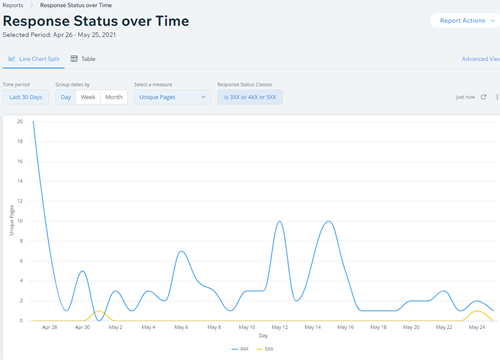
Use the Line View to identify trends, and the Table View to get details about specific pages.
Learn more about the Response Status Over Time report
Log Data Analytics Terms
Below are some of the terms that you can see in your Wix Marketing & SEO Reports:
Term | Definition |
Bot | Automated programs that search engines use to continually scan (or "crawl") live websites on the internet. Bots add the information they find to search engine databases in a process known as " indexing". |
Hit | A hit represents a single request made by a website visitor or a bot to a web server. It can be a request for a specific page, image, document, or other type of file. |
Response status | This is the response that a bot received for its request. It indicates whether the request was successful or not. There are different response statuses from different types, typically divided into the following categories:
|
Want to learn more about SEO terms?
Go to our index of terms for SEO.
This article is credited to the Wix team - https://support.wix.com/ and we thank them for that!