To ensure that your site remains live at all times, Wix plans are set to renew automatically at the end of the subscription period. If you don't want to continue with your plan, you can turn the auto renewal off. Turning off auto renewal will end your plan when your subscription expires.
Want to change your plan?
If you want to continue to enjoy premium benefits and features, you may be able to change your plan instead. Learn more about changing your plan.
Turning off auto renewal
Go to Premium Subscriptions in your Wix account.
Click the More Actions icon

next to the relevant plan.
Click Cancel Plan.
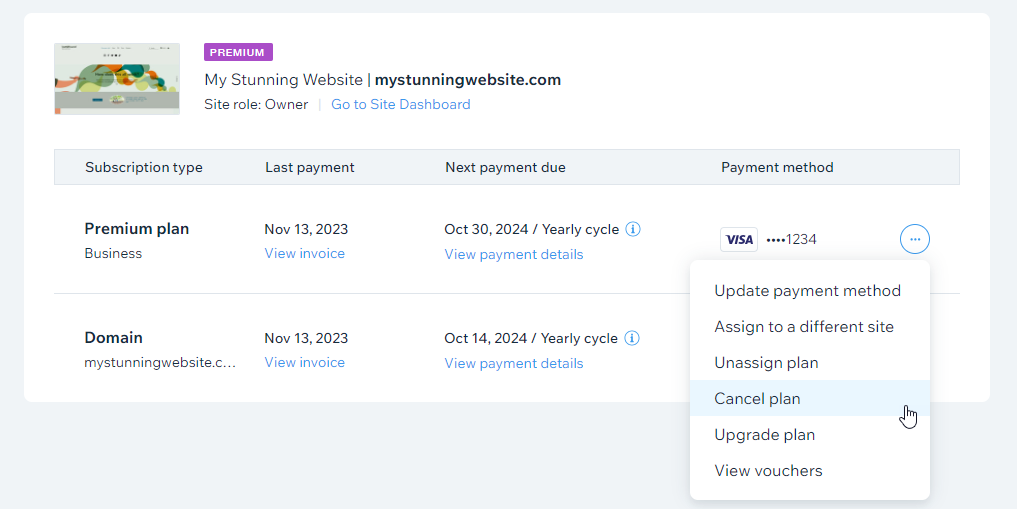
Click Cancel Now.
Confirm cancellation by clicking Cancel Now after providing your feedback.
FAQs
Click a question below to learn more.
What happens if I turn off auto renewal for a plan while it's in the 14 day refund period?
Studio and Premium plans come with a 14 day refund period for first-time purchases and upgrades. If you turn auto renewal off within this period, your plan is canceled immediately and you are fully refunded. To continue until the end of the subscription period, wait until the first 14 days have passed.
How do I know when the next payment is due on a plan?
Wix sends reminder emails starting 30 days before your payment is due. For yearly and multi-year plans, we will attempt to process your renewal payment up to 3 weeks before the plan's expiration date.
If you do not want your plan to renew, you must turn off auto renewal before your next payment date.
Tip: You can see the exact date in the Upcoming payment section of Premium Subscriptions in your Wix account.
How will I know when my plan expires?
Wix sends a reminder email 30 days before the subscription expires. You can also view your plan's expiration date from the Premium Subscriptions page.
If my plan expires, can my site still be viewed online?
If your plan expires, your site is still active and can be viewed online. You must either unpublish your site or hide your site from search results if you no longer want it to be live on the internet.
After your plan expires, your site address reverts to the free Wix URL (siteprefix.wixsite.com/siteaddress) and Wix ads appear on your site.
Can I change my mind and turn auto renewal back on?
Yes of course. You can turn auto renew back on again any time before the end of the subscription period. Your plan will renew on the next payment date as normal.
To turn auto renew back on:
Go to Premium Subscriptions in your Wix account.
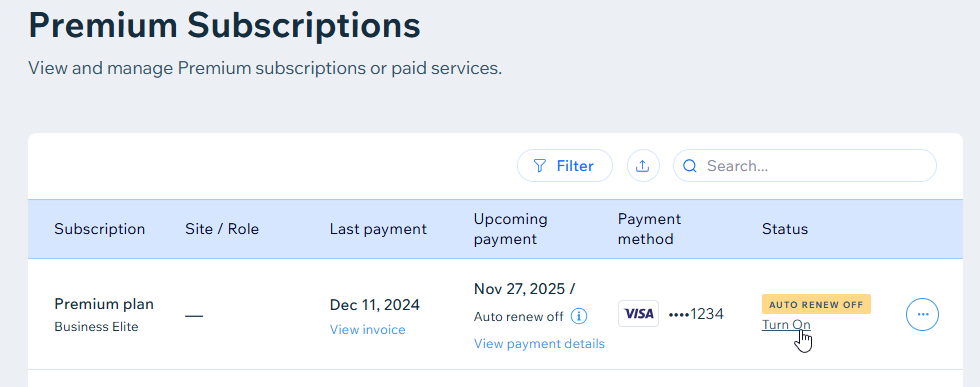
Find the plan with auto renew turned off.
Click Turn On.
This article is credited to the Wix team - https://support.wix.com/ and we thank them for that!