Important:
This article refers to the original Wix Hotels app. If you are using the new Wix Hotels by HotelRunner, read this article. Learn how to check which version of Wix Hotels you are using.
The Channel Manager from our partner HotelRunner is a complex feature that handles multiple systems at once. Sync issues can sometimes occur between Wix Hotels and the Channel Manager, or between the Channel Manager and the external channels (i.e. Bookings.com, Expedia.)
Note:
Any changes you make to the Channel Manager must be done through your Wix account. Do not sign in from Hotelrunner.com to try to make updates, as it may cause discrepancies with rates and availability to external channels.
Click the issue you're having to learn how to resolve it.
My Channel calendar is blocked or shows 0.00 for prices even though the Wix Calendar is normal
This is most likely because some weekend prices were missing when connecting the Channel Manager.
Check you've added weekend prices for your rooms as well as seasonal room rules.
Note: If you want to keep the same prices for weekends and weekdays, input the same value in both fields.
Reload your rates by doing the following:
Go to the Rooms tab in your hotel dashboard.
Select each room type.
Increase both the weekend and the weekday price by 1.
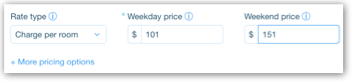
Click Save.
Wait five minutes and then reset the rates for each of your rooms to their original prices.
Reservations made in Wix are not showing up on my channels
Especially with newly connected hotels, some reservations (particularly manual reservations) may not sync.
Click on the reservation in the Wix Reservation Calendar.
Change the reservation status to Canceled but do not save.
Change the reservation status back to Reserved.
Click Save.
Please also contact us to inform us of the issue. Make sure to include the following information:
The room and date of reservation that is not syncing
The channel the reservation is not syncing to
Whether or not you have tried the workaround above
Reservations made on my Channel are not showing up in Wix
Note: If reservations are not being imported from your channel, first make sure the channel allows the importing feature. Certain channels are iCal channels, which only support a 1-way sync with Wix. You can see a list of supported channels at the bottom of this page.
Go to Calendar in your hotel Reservations tab.
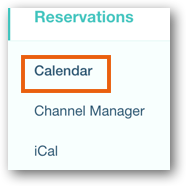
Select the room that should be showing the imported reservation, as well as the relevant dates.
Click Set as not available.
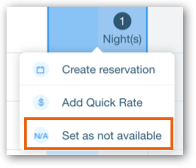
Wait five minutes, then hover over the blocked dates and select Unblock.
I changed prices in Wix that aren't reflected/only partially reflected on my external channels
To fix this issue you can try blocking and unblocking the dates in question where the prices aren't correct. We recommend blocking the dates +1 day. (Ex: If you've set a Quick Rate for the 24th-26th, try blocking the 24th-27th.)
Go to Calendar in your hotel Reservations tab.
Select the dates where the prices are incorrect +1 added day.
Click Set as not available.
Wait five minutes, then hover over the blocked dates and select Unblock.
What information should I include if I need to reach out for assistance?
For us to best assist you, it helps to have the following information ready:
All relevant information including the hotel name, rooms, and dates of reservations/incorrect rates you're seeing.
Any screenshots that illustrate the issue, particularly screenshots of your calendar from the external channels displaying the incorrect information.
Any links to your site's live booking pages on relevant external channels (Ex: your booking page on Booking.com or Airbnb.)
This article is credited to the Wix team - https://support.wix.com/ and we thank them for that!