Your site members can choose to keep their member profile private, or make it public:
Private profile: Their details are only visible to them; other members cannot see their information. This is for members who just want to track of their own activity on your site.
Public profile: Other members can see their information and profile on the Members page, follow their activity and send them messages.
If a member wants to be public, they can opt to join your community when signing up, or change their privacy settings from their My Account page.
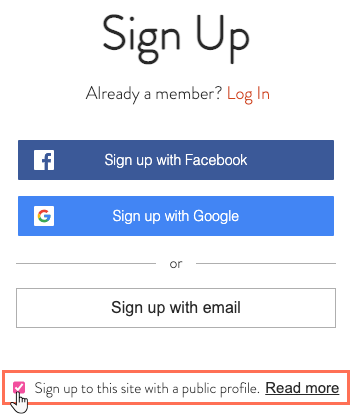
Joining the community while signing up
When new members sign up to your site, they can select the checkbox to make their profile visible to all other members.
Once they are part of your community, they can control the details other members see, write their own short bio and personalize their profile's cover photo.
Changing privacy settings from the My Account page
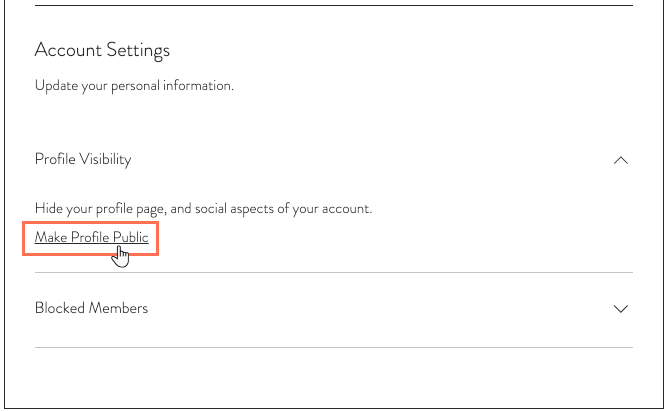
From their My Account page, members can control whether their profile is private or public. They'll find this setting under Profile Visibility.
FAQs
Below are some frequently asked questions about having a site community. Click a question below to learn more:
What kind of community can I create on my site?
A community is a set of social functions in your Members Area that provides your members with different ways to follow and communicate with each others. Once a member sets their profile as public, they are effectively joining your community.
Integrated with apps like Wix Blog and Wix Groups, the community allows your members to chat with other members, follow their activities on your site and more.
How is being a site member different from being part of a community?
Becoming a member: Site membership grants your visitors access to members-only pages, such as Wix Stores order history and Wix Bookings appointments. You can use the Members Area with these apps.
Joining the community: After joining a community, Wix Blog and Wix Groups members can comment, follow posts, and more. Their member profiles appear on your Members Area page.
I can't see certain members on the Members Page list. Why?
There could be two possible reasons for this to happen:
Private profile: The Members Page only displays members with a public profile. If a member's profile is set to private, you won't be able to see them here.
Different display name: The list shows your members' display name, not their first and last name. From the My Account page, members can choose a different display name which appears on their profile card.
This article is credited to the Wix team - https://support.wix.com/ and we thank them for that!