Some of your customers may not be required to pay tax on their purchases. This may include:
B2B customers
Non-profit or charitable institutions
Religious institutions
Individuals with disabilities
Veterans
Important:
Available tax exemptions vary by location. Consult a local tax authority to learn which of your customers qualify for a tax exemption.
Providing individual customers with tax-exempt status
You can manually grant tax-exempt status to any person in your site's contact list. Make sure the contact has an email address, as that address is what allows them to avoid paying tax at checkout.
Important:
To automatically receive tax-exempt status while checking out, the customer must enter the same email address.
To provide a tax exemption:
If not already added, add the customer as a site contact.
Note: Make sure to add the contact's email address.
Go to Tax in your site's dashboard.
Scroll down and click Manage Exemptions.

Click Add customer.
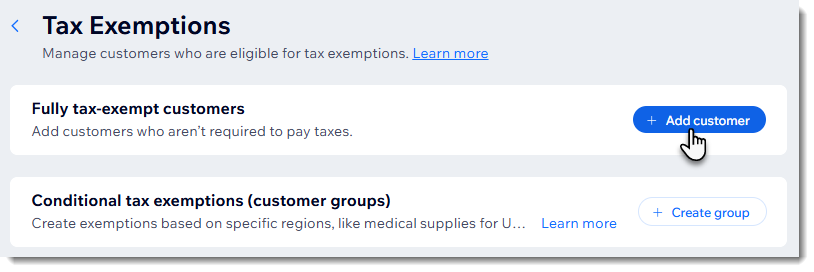
Select the relevant customer.
Click Save.
Setting up tax exemptions for groups
Instead of assigning tax exemptions to customers one by one, you can set up a tax exemption for an entire group and choose which tax types it applies to.
Before you begin:
Make sure to add the individuals that make up the group as site contacts.
If you want to set up a tax exemption for a specific group of products, create that product group.
To set up a tax exemption for a group:
Go to Tax in your site's dashboard.
Scroll down and click Manage Exemptions.
Click Create group.
Enter a name and click Next.
Note: This name is for internal use.
Select a region from the Select a region drop-down.
Click Exempt next to the relevant tax type(s) and click Next.
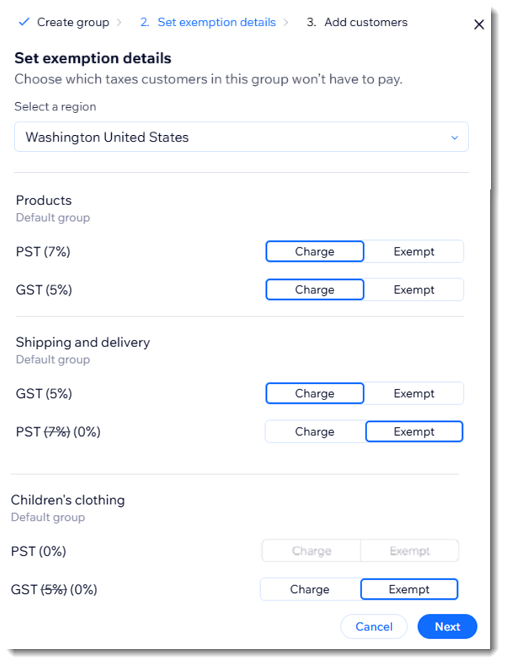
Select the customers you want to add to this exemption group.
Click Save.
What does my customer see at checkout?
The tax exemption display varies depending on whether you include tax in product prices or add it at checkout.
When you include tax in product prices, customers see the amount that was subtracted.
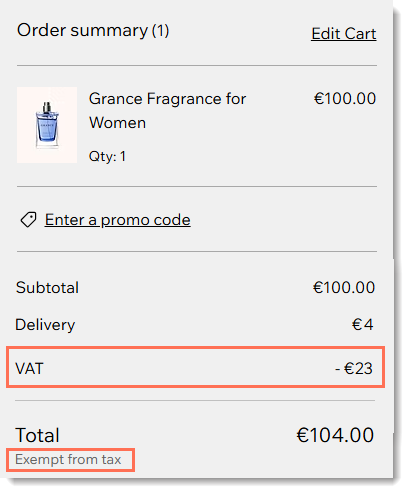
If tax is not included in the price, a notification appears stating that the customer is exempt from tax.
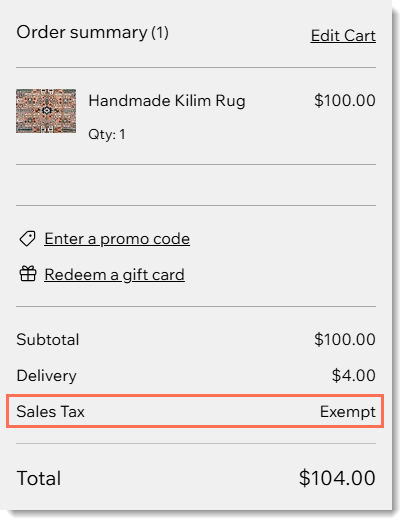
FAQs
Click below for answers to common questions about providing tax exemptions.
How can various employees of the same company receive tax-exempt status?
The tax-exempt status is connected to the buyer's email address, not the company name. To allow multiple employees to make company purchases without paying tax, add each employee as a contact and assign a tax exemption to each one.
Can my customer add their VAT ID at checkout?
Yes. You can use the Exemptify app by daxanema to let customers enter their VAT ID at checkout and automatically get tax-exempt status. You can also use the VAT ID to apply tax exemptions for eligible customers, for example after validating it through the European VAT Information Exchange System ( VIES).
Notes:
To add the app, click Exemptify by daxanema.
The app is not yet available in the Wix Harmony Editor.
Alternatively, you can add a custom field to the Checkout page, which can be used to collect the customer's tax ID. Note that the number will not be validated.
Can I provide a customer with a partial tax exemption?
Currently, you can only provide full tax exemptions.
Are there any cases where the tax exemption cannot be applied?
When a customer completes payment using a provider where checkout happens outside of Wix (e.g. PayPal, Apple Pay, or Google Pay), it's not possible to provide a tax exemption. To work around this, set up additional payment providers in Wix and instruct your customers to use them at checkout.
What happens if my customer's phone details don't match those in Wix Contacts?
If there is a mismatch between a customer's country code / phone number listed in the saved contact card and the ones entered at checkout, the exemption won't apply.
This could happen if your customer selects the wrong country code at checkout or enters an incorrect phone number. This could also occur if the details in the contact card are inaccurate.
To fix this problem, you can either edit the contact in Wix Contacts or ask your customers to select the correct country code and enter the right phone number when they complete a purchase.
Can a tax exemption be applied at a point of sale?
After giving a customer tax-exempt status, they automatically get a tax exemption when purchasing items in the POS Register. Tax exemptions are not available with other POS solutions.
This article is credited to the Wix team - https://support.wix.com/ and we thank them for that!