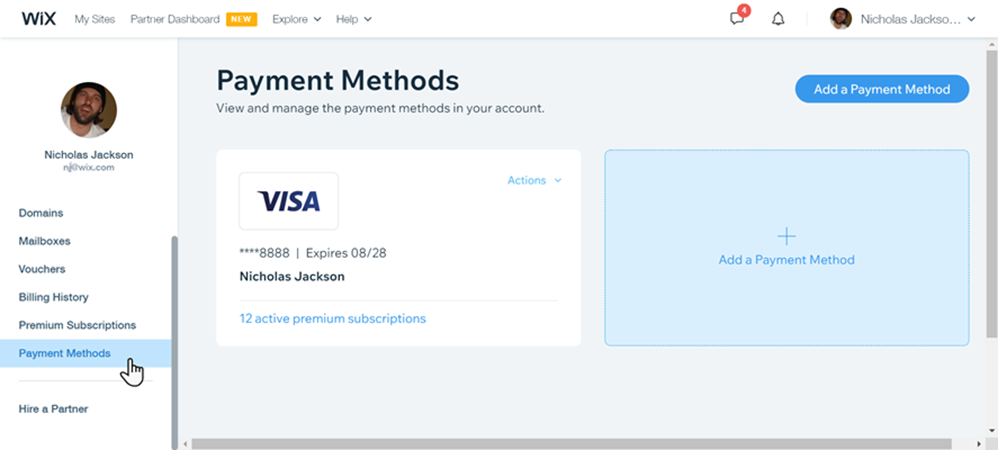
Manage your saved card information and other payment methods from the Payment Methods page on your Wix account.
Update your existing card details, add a new card or payment method, or remove a payment method that you no longer need.
The payment methods saved to your account can be used to purchase premium subscriptions such as site upgrade plans, domains and business email.
Adding a Payment Method
Add a new payment method to use for your future purchases. You can choose one of your saved payment methods on the checkout page.
To add a new payment method:
Go to Payment Methods in your Wix account.
Click Add a Payment Method.
Select the payment method and enter your details.
Click Save.
Updating a Payment Method
Update an existing payment method being used for existing subscriptions. Any changes you make are automatically applied to the subscriptions connected to your payment method.
To update a payment method:
Go to Payment Methods in your Wix account.
Click Actions next to the relevant payment method.
Click Update.
Click Next.
Update Your card/payment method details.
Click Update.
Removing a Payment Method
Remove a payment method you no longer use. You can remove a payment method as long as it's not connected to an active subscription.
To remove a payment method:
Go to Payment Methods in your Wix account.
Click Actions.
Click Remove.
Click Remove to confirm.
Notes:
Some payment methods (e.g. Boleto in Brazil) can't be added as a payment method. You can select Boleto on the checkout screen when making a purchase.
If you remove a payment method you, or anyone else with billing permissions, can no longer use that payment method for future purchases.
You can choose to pay via PayPal at the checkout. You are brought to the PayPal portal in order to complete your payment. Once finished, you are brought back to your Wix account.
This article is credited to the Wix team - https://support.wix.com/ and we thank them for that!