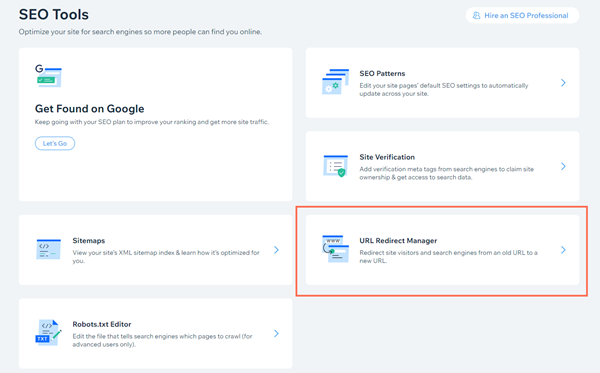
To set up URL Redirects:
You must upgrade your Wix site with a Premium Plan and connect a domain.
URL Redirects allow you to maintain your previous site's Google search ranking data when moving your site to Wix. URL Redirects also send people to your new Wix site when they click on old links in search results.
Even if Google hasn't checked in on your site in months, result links will bring visitors to your new site rather than showing them a 404 broken page error.
Important:
It is not possible to use a Source Link with a # in the URL or to redirect to a blog page or list item.
URL redirects for moving to Wix with the same domain
When building your new site with Wix, create new pages with URLs that match the ones from your old site. If you have new pages, and cannot match the new URLs to the old ones, you can retain your SEO rankings by creating a URL redirect.
Once you have published your new Wix site, make sure to verify your site with Google Search Console or other search engines. You can then submit your sitemap directly to Google.
Important:
To connect to Google Search Console, you must have a Premium plan and a domain connected to your site. This can be either a domain purchased from Wix or a domain purchased from another domain host.
URL redirects for moving to Wix with a new domain
Add your old domain to your Wix account and connect it as a secondary domain to your new domain. This will set up a URL redirect from the old domain to the new domain.
Getting the most out of your URL redirects
Click below for tips on how to effectively create your URL redirects:
Analyze your previous site's SEO
It's important to review your previous site, in terms of SEO, so similar content can be used when creating your new site. This includes reviewing your previous site's text, images, meta tags, header tags, and menu structure.
Take note of the search phrases that are being used to target each of your pages. Map out what content is located on each page. If you have a site with many pages, decide which pages you will be redirecting and which are not necessary.
Build your new site with Wix
Using the information that you gathered in the previous step, start to build your site. Make sure that your new site has a corresponding page for each of the important pages of your previous site.
Your new site does not need to be a duplicate of your previous site, but it is important for the content, on each corresponding page, to be similar. For example, if your previous site's 'About' page contained information on what your business does, your new site's 'About' page should contain the same information.
At the end of this step, you should have a draft version of your new site prepared. In order to avoid exposing your site to search engines before setting up your redirects, we recommend disabling Let search engines index your site from your site's SEO settings. Learn How
Set up your URL redirects
In order to set up your URL redirects correctly, it's helpful to determine which of your previous site pages have already been indexed by Google. To do so, perform the following search in Google - site:yourdomain.com.
From the search results, note down the URL of each page that appears. You can also access all of your previous site's URLs by looking at the site map. Consult your previous site builder on how to access your sitemap.
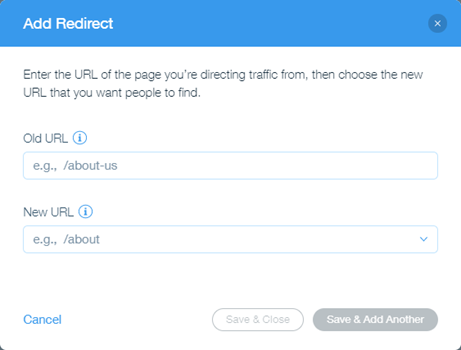
Set up your URL redirects so that each relevant URL corresponds to a page on your new site.
Publish your site
You are now ready to publish your site! Go ahead and click Publish from inside the Editor for the URL redirects to be activated. Make sure that you have selected Let search engines index your site from your site's SEO settings. Learn How
Review the redirects that you've set up and make changes if necessary.
Submit your sitemap to Google
Google periodically caches your site, but this can take up to 3 months. To speed up this process, we recommend opening a Google Search Console account and submitting your automatically generated sitemap to Google.
Want to learn more about 301 redirects?
Check out our article about 301 redirects in the Wix SEO Hub.
Get tips for successfully migrating your site.
This article is credited to the Wix team - https://support.wix.com/ and we thank them for that!