Important:
This tax solution is currently available for Wix Stores, Wix Bookings, Wix Restaurants Orders (New) orders, Wix Donations, and is in the process of becoming available for Pricing Plans.
Using a different app? Click an option below:
In some countries, merchants are obligated to display prices with the tax included. In other countries, such as the US and Canada, product prices are displayed without tax. The sales tax is added later during checkout.
Important:
Check local regulations in your country on how tax should be displayed in your store.
To set whether tax is included in the product price:
Go to tax in your site's dashboard.
Scroll down to the Tax Settings section.
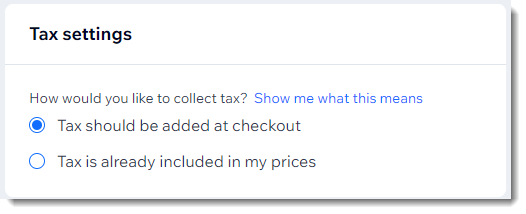
Select an option:
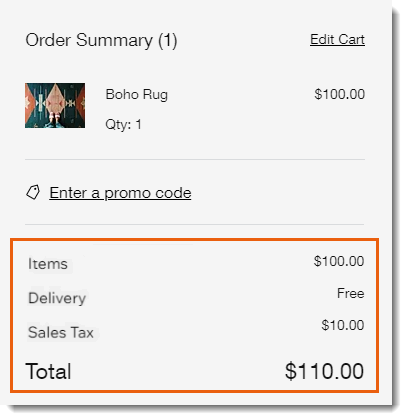
Add tax at checkout: When buying an item that costs $100, customers see a total of $110 during checkout:
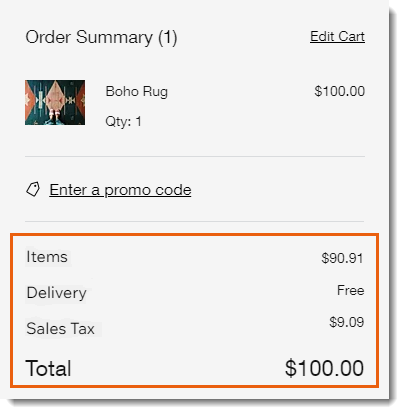
Include tax in item price: Tax amount is subtracted from the total price. When buying an item that costs $100, customers see a total of $100 during checkout, with the sales tax listed separately.
Notes:
To calculate sales tax, you can use this tool. Make sure to specify if tax (VAT) is added at checkout or excluded.
Did you create shipping rules or coupons based on price (e.g. free shipping on sales over $100)? Note that the price without tax is used for these calculations (e.g. $90.91 in the example above).
This article is credited to the Wix team - https://support.wix.com/ and we thank them for that!