Google Ads with Wix allows you to create a campaign directly from your site's dashboard. This is a great way to get more eyes on your business when advertising on Google.
Our integrated paid advertising solution seamlessly connects your Google campaign to your site, and shows how ads convert visitors across your business tools.
Benefits of creating a Google Ads with Wix campaign
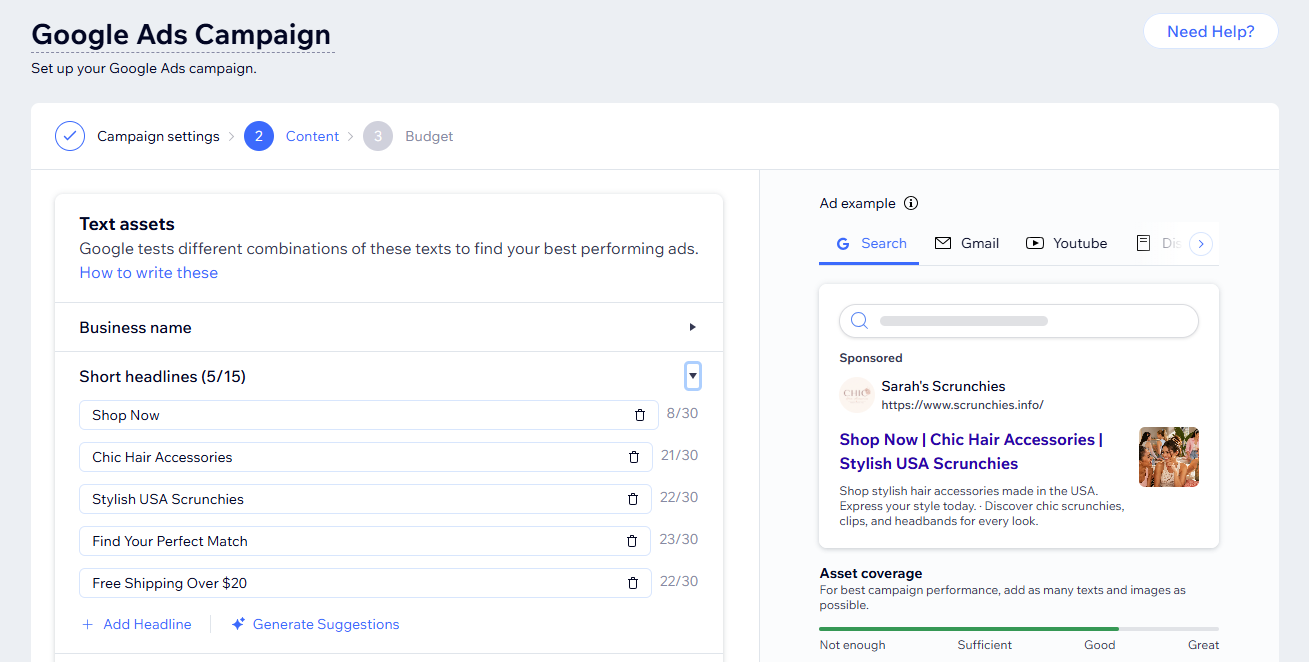
When you create a Google Ads campaign with Wix, you get the opportunity to advertise on Google's search engine in addition to Wix's 24/7 customer support. You also get access to:
A guided, step-by-step setup process from your site's dashboard
Wix's integrated paid advertising solution
Content and keyword theme suggestions from Google Ads to help in ad creation
Seamless integration between Google Ads and your Wix site for the most accurate conversion tracking from ads to website.
If you've never advertised on Google Ads before, you may be eligible for a promotional ad credit from Google to help grow your campaign.
Note: Eligibility and promotional credit amounts are determined by Google based on your location and currency. Wix does not control these amounts. Learn more about the Google Ads promotional credit for Wix sites. Terms and conditions apply.
How do I get started?
Go to Google Ads in your site's dashboard.
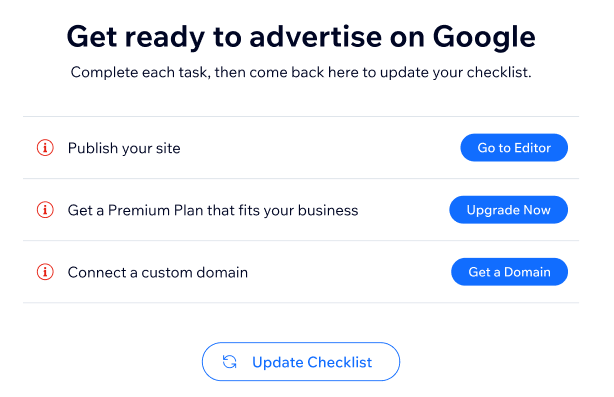
Complete the Get ready to advertise on Google checklist which includes:
Publishing your site
Purchasing a Premium plan that fits your business
Connecting a custom domain
Build your Google Ads campaign including customizing your ad settings, creating your ad content and setting a campaign budget.
Purchase a Google Ads with Wix subscription and launch your campaign.
Note:
A new Google Ads account is created for you when you launch a Google Ads campaign with Wix. Any existing Google Ads accounts you might have are separate from this account.
FAQs
Below are some frequently asked questions about creating a Google Ads campaign with Wix.
What setup is required before I launch a campaign?
Before you can run a Google Ads campaign with Wix make sure you've completed the following steps:
Publish your site
Upgrade to a Premium plan
Connect a custom domain
What are the steps involved in creating a Google Ads campaign?
You create your campaign from your Wix dashboard. The dashboard walks you through step-by-step instructions for each element of the campaign, including:
Picking locations you want to advertise (cities, countries, etc.)
Picking keyword themes for your ad targets
Creating your ad content
Deciding on an ad budget that works for your business
Launching your campaign
Learn more about creating a campaign.
How much does it cost to run a Google Ads campaign with Wix?
Google Ads by Wix is paid through a monthly subscription. When you set your campaign budget (daily spend on ads) you can see how much the monthly subscription amounts to.
How am I charged for my daily campaign budget?
Each month, you'll be charged for the clicks your campaign got in the previous month. Your campaign might spend less than your daily average in some days, and up to twice your average on other days. But each month it won't spend more than your daily average times 30.4 (average number of days in a month).
Learn more about setting your Google Ads with Wix budget.
Can I connect an existing Google Ads account to Google Ads with Wix?
Currently, Google Ads with Wix does not offer the option to connect an existing Google Ads account. Any campaigns and campaign data launched through Google Ads with Wix can only be managed through the Wix dashboard.
If you already have an existing Google Ads account, that account is separate and all data can only be managed through Google. You cannot access any Google Ads with Wix data from Google's interface.
This article is credited to the Wix team - https://support.wix.com/ and we thank them for that!