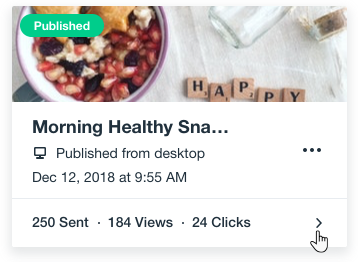
Using the Wix app, you can keep track of your email campaigns and analyze their performance on the go. Get an overview of all your campaigns at once from the main dashboard and click a specific campaign to see more details.
Recipient Stats
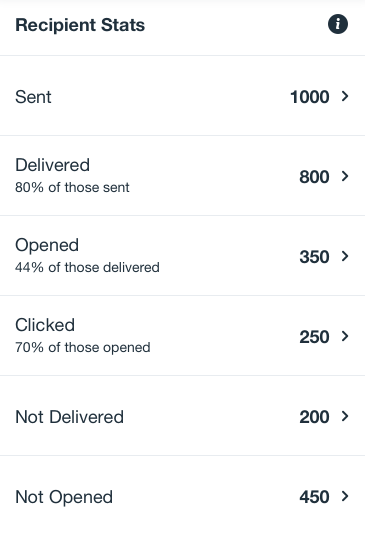
Recipient Stats are the individual stats for each recipient you sent the email campaign to. In this section, each contact is counted once even if they took the action multiple times. For example, if the same person has opened your email three times, they will still be counted as one.
Sent: The total amount of contacts you've sent the email campaign to.
Delivered: The total number of contacts who received your email campaign to their inboxes.
You can also see the percentage they make of those sent.
Opened: The contacts who have opened your email campaign.
You can also see the percentage they make of those delivered.
Clicked: The contacts who have clicked links inside your email campaign (a button, a direct URL).
You can also see the percentage they make of those opened.
Not delivered: The total number of contacts who did not receive your email campaign because these emails bounced.
Note: When an email campaign can't be delivered to an email address, it’s usually because it has bounced (has been blocked by the recipient’s email server).
Not opened: The contacts who received the campaign but did not open it.
Example
Lisa owns an online health & wellness store. She sent her weekly newsletter to 1,000 contacts.
In the Recipient Stats section, she can see a breakdown of her email's performance:
Sent: Her email was sent to a 1,000 contacts.
Delivered: 800 of her contacts have successfully received the newsletter to their inbox.
Opened: Out of the recipients who have received the campaign, 350 people (44%) opened and read it.
Clicked: Out of the recipients who have opened the campaign, 250 people (70%) also clicked on links inside the campaign.
Not Delivered: The 200 remaining contacts who did not receive the campaign.
Not Opened: The 450 contacts who have received the campaign but did not open it.
Tip:
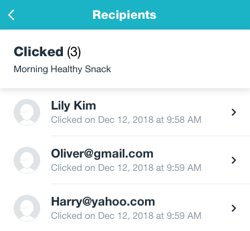
Click any stat to see the list of recipients that we counted.
Email Stats
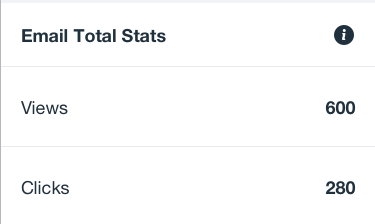
The Email Stats show the total amount of times people viewed and clicked your email campaign, either on desktop or mobile device. The totals count each action individually, even if it was done by the same person. For example, if a recipient has seen your campaign four times, all four times count towards the total amount of views.
Views: The total number of times recipients viewed your campaign.
Clicks: The total number of times recipients clicked on links in your campaign.
Example
Lisa owns an online health & wellness store. She sent her weekly newsletter to 1,000 contacts.
In the Email Total Stats section, she notices that her campaign has gained 600 views so far. This doesn't necessarily mean 600 people have viewed the campaign, but that the campaign was viewed 600 times in total.
She also sees there is a total of 280 clicks on her campaign, which means not every recipient has clicked on the links inside her campaign.
Social Stats
Every email campaign has a landing page with a direct URL that you can share with other people on any platform. In Social Stats, you can see the total amount of times people viewed or clicked your campaign's landing page. Each action is counted individually, even if it was done by the same person.
Views: The total number of times people viewed your campaign after its URL was shared on social media and other communication platforms.
Clicks: The total number of times people have clicked on your campaign's landing page to view it in full screen, after it was shared on social media channels.
Tip:
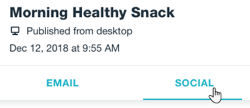
If you've sent an email campaign to your subscribers and also shared its URL on other platforms, the social stats appear in a separate tab. The tab is created automatically once your campaign gets views through the direct link.
Example
Lisa owns an online health & wellness store. She created an Email Marketing campaign and shared a direct link to its landing page on social media and other channels.
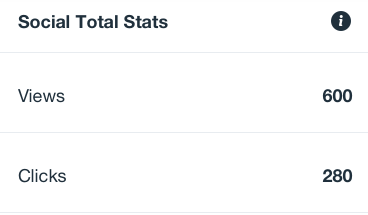
In the Social Stats section, Lisa sees that her campaign was viewed 600 times. Among the 600 views, there were 280 clicks on links included in the campaign.
Site Activity
The top of your screen shows a breakdown of the different types of activity created from your email campaign. Here, you can easily track traffic, sales and more by swiping left.
Site Activity shows how effective an email campaign is in bringing in traffic and sales to your site.
Total orders: The number of store orders, bookings, and any other purchases placed on your site. This includes paid, canceled, and refunded orders.
Total sales: The total amount of money expected from all sales, before deducting refunds, shipping, and fees. This includes both online and manual payments.
Site sessions: A session is a visit to your site. A unique visitor can have more than one site session.
Note:
Site Activity metrics are updated every 3 hours.
This article is credited to the Wix team - https://support.wix.com/ and we thank them for that!