Important:
If you previously verified your site with Google manually, your site is already connected. You don't need to connect your site in your SEO Setup Checklist. If the step is marked as not completed in your checklist, you can ignore it.
The Wix SEO Setup Checklist is a step-by-step checklist designed to help you get found online. The SEO Setup Checklist gives you advice about the information your site needs to connect and verify your site with Google.
You can create a tailored checklist based on your business, your location, and your keywords. Follow the steps in your checklist to improve the search engine optimization (SEO) of your site and get your site indexed on Google. After you've connected, the SEO Setup Checklist helps get your site indexed quickly so that your site appears in search results.
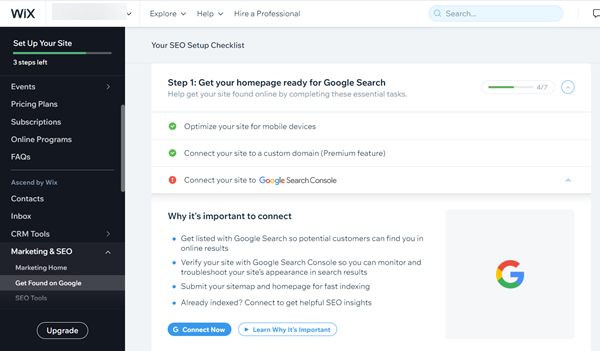
Connecting your site to Google
You can connect your site to Google in Marketing & SEO in your site's dashboard.
Important:
To connect to Google Search Console, you must have a Premium plan and a domain connected to your site. This can be either a domain purchased from Wix or a domain purchased from another domain host.
To connect your site:
Go to the SEO Setup Checklist in your site's SEO dashboard.
Complete the checklist in Step 1 of your SEO Checklist.
Click Connect to Google.
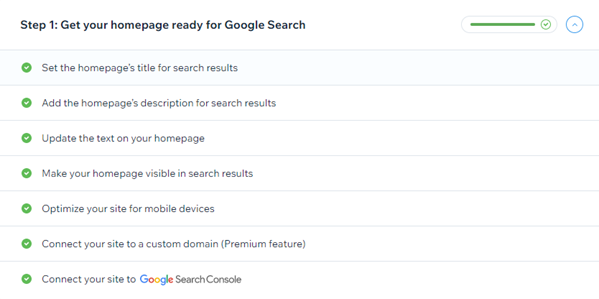
Important information about verifying with SEO Setup Checklist
Only site owners and admin collaborators can access SEO Setup Checklist. It is not available to back-office managers. Learn more about site collaborator roles and permissions.
Verifying your site with Google Search Console with Wix SEO Setup Checklist is only available for Premium sites with a connected domain.
If your site is missing any information necessary to submit your site to Google, it will be listed in the pop-up. Follow the instructions in the popup to learn how to add your missing information.
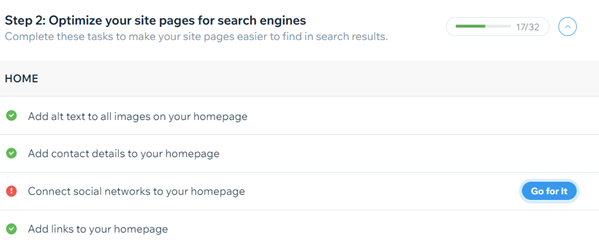
It's possible to skip a step and complete the steps after it. However, any step you skip will show as incomplete until you finish it. You also won't be able to complete your SEO Checklist until you finish all of the steps.
It is not possible to verify your site using SEO Setup Checklist more than once. If you need to verify your site again, you must do it manually. Learn how
Note:
If you get an error after trying to connect your site to Google, you can try the steps in our Troubleshooting article.
Want to learn more?
Check out our beginner's guide to Google Search Console in the Wix SEO Learning Hub.
You can read about Wix's great SEO features and how to use them in the Complete Wix SEO Guide.
This article is credited to the Wix team - https://support.wix.com/ and we thank them for that!