With Google Tag Manager, you can implement a tag management system so you can keep your tags and third party code snippets updated and organized in one convenient location.
You can connect your site to Google Tag Manager in Marketing Integrations to start tracking visitor events on your site.
Important:
By using this service, you are engaging directly with a third-party service provider. We recommend reviewing the service provider's Privacy Policy and Terms of Use prior to your use of such third-party service. You acknowledge that we are not liable for any loss or damage resulting from your use of such third-party service, including any liability arising from any personal data exchanged between you and such third-party.
To use this feature, you must have a Premium site and a connected domain.
If your site uses a cookie banner, Google Tag Manager will only gather data after a visitor provides consent and approves using the relevant cookies. Learn More
Step 1 | Get your Google Tag Manager account ID
First, you need to get your account ID from your Google Tag Manager account.
Sign in to your Google Tag Manager account.
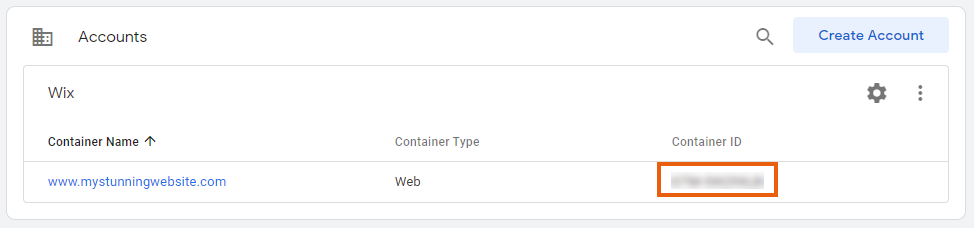
Copy the ID from the Accounts page.
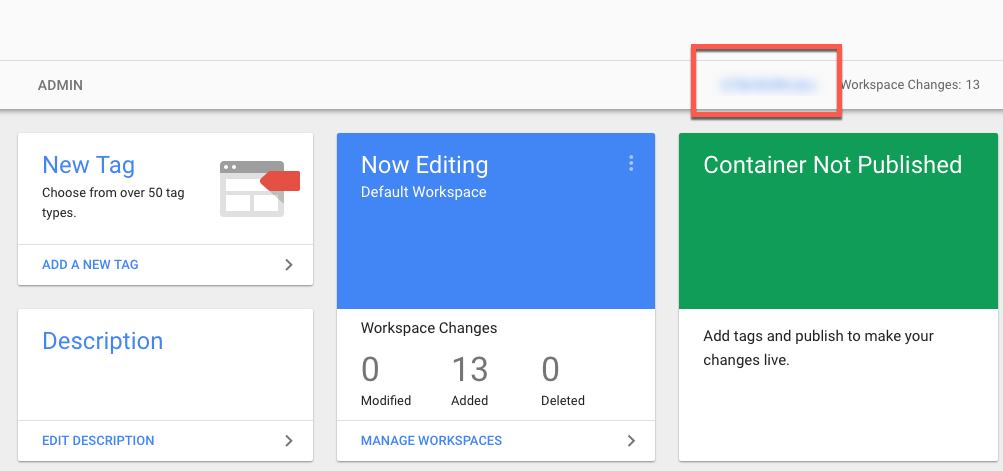
Or select your account and copy the ID from your Google Tag Manager dashboard.
Note:
Make sure to set up the parameters of your tag(s) in your Google Tag Manager account. Learn more
Step 2 | Add the code to your Wix site
Next, you need to add your ID from your Google Tag Manager account to your Wix account in Marketing Integrations.
Go to Marketing Integrations in your site's dashboard.
Click Connect under Google Tag Manager.
Click Add Google Tag Manager.
Enter your Google Tag Manager ID.
Click Save.
Note:
Wix does not provide support for technical difficulties associated with third-party code snippets. If you are experiencing an issue with your code snippet, please contact the provider directly.
This article is credited to the Wix team - https://support.wix.com/ and we thank them for that!