You can connect Yandex Metrica to your site to measure and analyze the behavior of your site's visitors. Get detailed traffic data about your desktop and mobile visitors in real time and identify the channels that drive your audience to your site.
Important:
To use this feature you must have a Premium site with a connected domain.
If your site uses a cookie banner, Yandex Metrica will only gather data after a visitor provides consent and approves using the relevant cookies. Learn More
Step 1 | Get Your Yandex Metrica Tag
First, you'll need to create a tag in your Yandex Metrica account.
To create your tag:
Sign in to your Yandex Metrica account.
Click Add tag at the top left of your screen.
Enter a tag name next to Tag name.
Enter your site's domain next to Website address.
Tip: Enable the Session Replay feature by clicking the Session Replay, scroll map, form analysis toggle.
Select the I accept the Terms of Use checkbox.
Click Create tag.
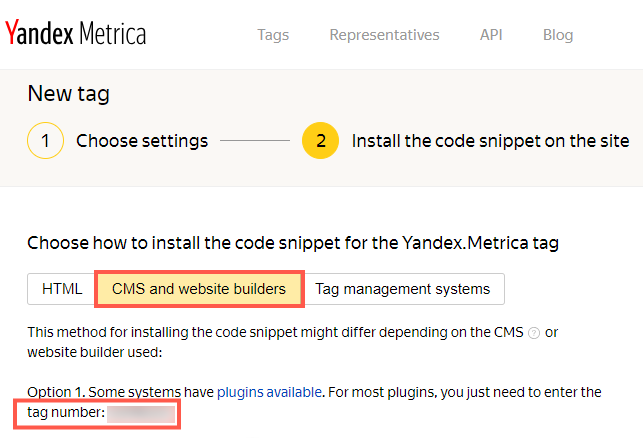
Select CMS and website builders.
Copy the tag number under Option 1.
Step 2 | Connect Your Yandex Metrica Tag to Your Site
After you've created your tag, you can add it to your site in Marketing Integrations in your site's dashboard.
To connect your tag:
Go to Marketing Integrations in your site's dashboard.
Click Connect under Yandex Metrica.
Click Add Yandex Metrica Tag.
Enter your Yandex Metrica tag number in the pop-up.
Click Save.
Note:
If you have connected multiple domains to your site, make sure to add your Yandex Metrica code to your primary domain only, rather than your secondary domain(s).
Once you have added the code to your site, it may take up to a week before you begin to see the statistics in your account.
This article is credited to the Wix team - https://support.wix.com/ and we thank them for that!