PII (Personally Identifiable Information) includes items such as full name, address, email address, social security numbers, phone number, etc. Learn more about PII from gdpr.eu.
PII is considered personal information by different legislators and regulators, and because of this, Wix handles it differently than other content or data.
While all Wix records are stored encrypted on the disk of our DB machines, for sensitive data such as PII, our policy is to add another layer of protection to the data at the application level.
Note:
PII encryption does not change data access permissions. Appropriate permissions must be set to maintain the confidentiality of the data. Read more about changing your collection permissions.
Best practice in PII data handling
As part of efforts to protect data and specifically sensitive data like PII records, Wix guidelines require all PII data to be stored encrypted by the application that handles the data.
First, you should make sure that the permissions of your collection are set properly, not allowing anyone that does not have the relevant permission to read, update, or delete data.
For Wix sites, this means that any collection field that includes PII data (e.g. marketing sites that collect and store site visitors' sensitive data, etc.) should be encrypted. To allow a field to be encrypted, you need to enable the PII toggle in the CMS:
Then, turn on encryption for each field that stores PII. You can encrypt 'Text', 'Address', and 'Email' fields. Encryption is on by default for new 'Email' fields.
Notes:
Public collections: If anyone can view your collection, a warning appears when you turn on encryption. Update your collection permissions so the encrypted field isn't exposed.
Locked toggle: You can't change encryption for slug fields or for fields in external collections. You also need permission to edit the collection's fields.
To encrypt a field:
Go to CMS in your site's dashboard. Alternatively, you can click the CMS icon

in your editor, then click Your Collections.
Click the relevant collection.
Click Manage Fields.
Choose what you want to do:
Add a new field: Click + Add Field, choose a 'Text', 'Address', or 'Email' field type, then click Choose Field Type.
Edit an existing field: Click the More Actions icon

next to the relevant field and select Edit.
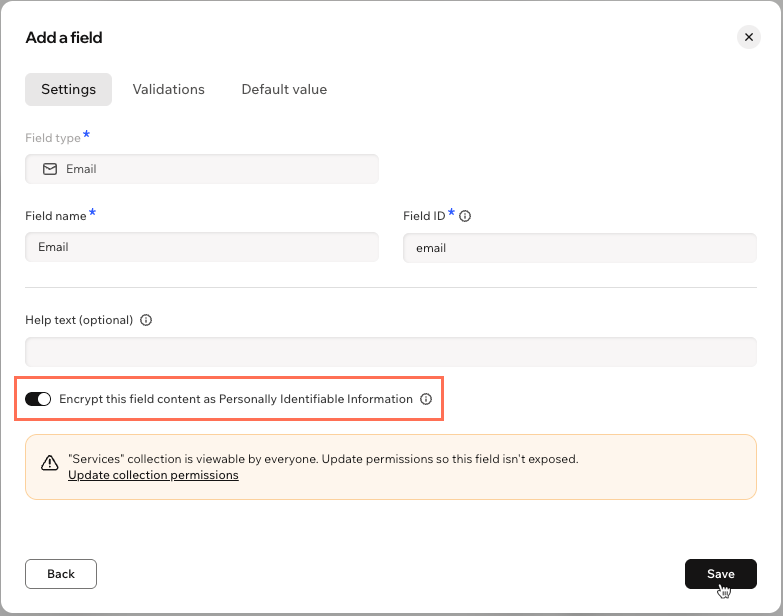
Enable the Encrypt this field content as Personally Identifiable Information toggle.
Choose how to save your changes:
Save the field only: Click Save.
Save and update permissions: If the warning appears, click Update collection permissions. Then click Save to save the field and open the collection's permissions.
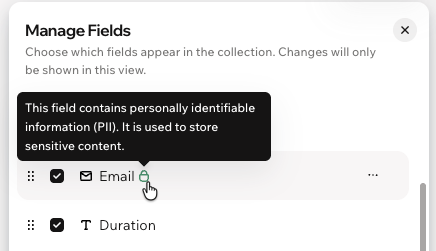
Notice the green PII indicator next to the field name when encryption is on.
Understanding PII warnings
Encrypting a field adds another layer of protection to its data. It doesn't change who can view the collection. If your collection permissions let anyone view the content, the encrypted data can still be exposed. To help you catch this, a warning appears in 2 places.
Field settings: When you turn on encryption in a collection that anyone can view, a warning says the collection is "viewable by everyone." Click Update collection permissions to go straight to the collection's permissions.
Permissions & privacy: When a collection has encrypted fields and anyone can view it, you see: "This collection contains sensitive fields but is open to everyone. Consider restricting view access."
To clear the warnings, restrict who can view the collection. For example, set Who can view this content? to Members only, or use Advanced permissions. Learn more about changing your collection permissions.
Encryption and storage of PII
This section includes more details about how PII data is encrypted, how it is stored differently to other data, and what its limitations are.
How encryption is applied to the data:
All fields marked as PII are automatically migrated to be stored encrypted in the collection with a unique encryption key.
Data in the field is stored encrypted using AES with a 256bit site encryption key.
Encryption is applied immediately.
Note: While the encryption process begins immediately, it may still take some time to complete depending on the size of data being encrypted. However, while encryption takes place behind the scenes - you can continue to work with your site's data as normal.
Access to data automatically returns the decrypted data in the same manner as for other fields.
Export data can be used to work with the collection data locally or to import it to a designated system. Regardless of the method, it is not advised that you retain large lists of PII locally on your workstation.
All data backups are encrypted in full using the same site key, regardless of any PII data.
Limitations of PII encrypted data:
PII encryption does not protect data in a collection if that data is exposed via permission misconfiguration - be sure to set collection permissions properly.
PII encrypted fields have limited capabilities for searching via code or via CMS.
Once a field is marked as a PII encrypted field, it disables some functionalities from that field, such as sorting and querying operations other than "eq", i.e. query by exact-match only, for that field.
PII that can be considered public
PII data is not necessarily private information. For example, a site’s owner can display their employees' private home telephone numbers, which are available in the phone book; however, those numbers should be considered as PII.
For an example like this, it is not necessary to use PII encryption, as it is considered public data.
PII in relation to GDPR
Among other rights, customers have the right to access or delete their data at any time under GDPR (and similar privacy laws such as the LGPD and CCPA). With Wix, you can provide your site visitors with access to their data or the right to delete their data from your database entirely.
As a site owner, it is your responsibility to reply and allow your site visitors to exercise their right to access and delete their data. Likewise, if you receive a delete request, you must ensure that all their data is deleted. Learn more
It's important to note that when a site visitor requests access to their data (where they are supplied with a data file), or to have their data deleted, there is certain data that is not included in either the accessed data file or the deleted data. This includes data about site visitors and members collected by custom flows such as Wix Forms, or data stored in a custom flow in a collection.
Important:
Marking your data as PII and using the encryption tool may not guarantee compliance with other legislations, such as The U.S. Health Insurance Portability and Accountability Act (HIPAA).
This article is credited to the Wix team - https://support.wix.com/ and we thank them for that!