When you need an exact copy of an existing collection's fields and settings, you can duplicate the collection. This helps you save time and ensure consistency in your CMS (Content Management System) without needing to manually recreate the fields and settings.
For example, if you manage a blog site with multiple authors, each needing a similar collection structure, you can duplicate an existing collection and make minor adjustments.
Duplicating a collection copies the field structure and collection settings only. The content, which consists of items and their field values, is not duplicated.
Duplicating CMS collections
Duplicating a collection creates a new collection with the following duplicated settings:
All fields and their settings, including Personally Identifiable Information (PII), field validations, help text, and default values.
Control item visibility status (Visible or Hidden).
The collection’s original location (whether it’s on the main CMS page or inside a specific folder).
After duplicating your collection, you can copy and paste from the original collection if you want to duplicate the content. You can also import items via CSV file, add items manually, or collect user responses submitted through input elements.
To duplicate a CMS collection:
Go to CMS in your site's dashboard.
Click the More Actions icon

next to the relevant collection.
Select Duplicate collection.
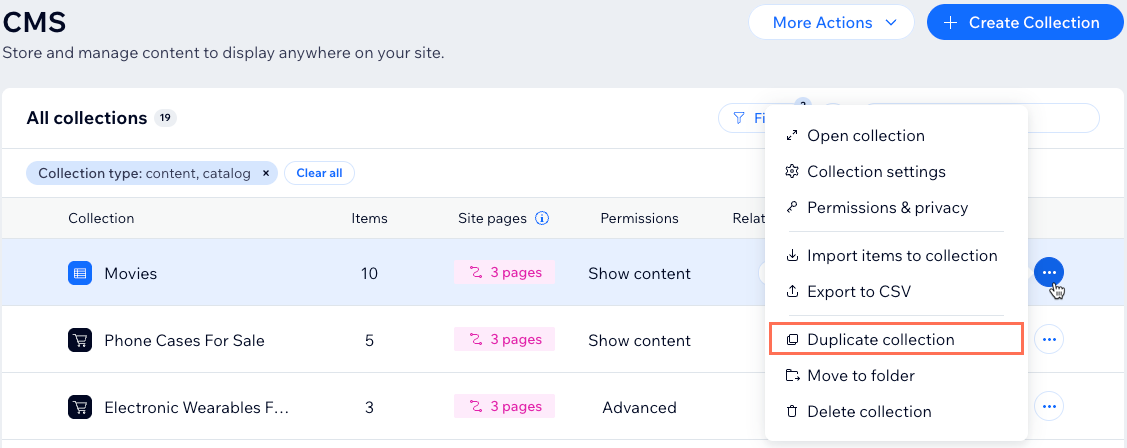
Enter a name for the duplicate collection.
(Coding only) Enter a collection ID to use in your code. This cannot be modified later.
Click Duplicate Collection.
FAQs
Click below for answers to common questions about duplicating CMS collections.
What types of collections can be duplicated?
You can duplicate collections you created in the CMS. This feature is not available for collections from Wix apps, Wix forms, blocks, or external sources.
Can I duplicate collections in the Wix Studio for enterprise solution?
Yes. You can duplicate account-based CMS collections that are not tied to any particular sites in the enterprise dashboard. However, you cannot duplicate shared collections within individual sites.
Can I translate duplicated collections?
Duplicating a collection does not automatically enable it for translation in Wix Multilingual. After adding content to your duplicate collection, make sure to add it to the translation manager to translate it into other languages.
Learn more about translating your CMS collection content.
What fields and settings get duplicated when I duplicate a collection?
When you duplicate a collection, the following fields and settings are included:
Fields and their settings: This includes PII, validation rules, help text, and default values.
Collection permissions and privacy settings: Maintain the same permissions as the original collection.
Visibility settings: The status of the Control item visibility toggle (Visible or Hidden) is carried over.
Original location: The collection is created in the same location as the original, on the main CMS page or in a collection folder.
Important: This feature currently does not support duplicating:
Content (items and field values) within the collection.
Named collection views.
Automatic enabling of the Mirror on Site feature.
Automatic enabling of translations in Wix Multilingual.
How do I add items or fields to the duplicated collection?
You can enhance your duplicated collection by adding new fields or items:
To duplicate content from the original collection: Copy and paste items from the original collection into the duplicated collection.
To import items via CSV file: Click Import CSV file to upload items from a CSV file.
Note: CSV imports are not available for single-item collections.
To add items manually:
Click + Add Item at the top right of the collection.
Fill out details in the relevant fields and click Save.
Repeat to add more items as needed.
To collect user responses: Use input elements on your live site to gather submissions that populate the collection automatically.
What happens to the original collection?
Duplicating a collection does not affect the original collection. It remains intact and fully functional.
This article is credited to the Wix team - https://support.wix.com/ and we thank them for that!