In the CMS (Content Management System), collections are databases where you store content that can connect to your page elements. Collections consist of fields that determine the type of content you can store for each item in the collection.
When you create a new collection, choose from the following types:
Content collection: Store and manage any type of content to use across your site, such as team members, blog posts, testimonials, or project portfolios. Content collections can hold multiple items in a table layout, or a single item in a form layout. Learn more about single item collections.
Catalog collection: Store items you want to sell directly from your site with cart and checkout pages. Learn more about selling items from catalog collections.
Category collection: Store categories for organizing and grouping items in other collections. Learn more about using category collections to organize your content.
You can set each collection's permissions and privacy to determine who can view, add, and manage the content.
Before you begin:
Make sure to add the CMS to your site to start creating collections.
Creating a CMS content collection
Create a new content collection to store and manage items you want to display on your site. Content collections use a table layout where each row contains content about an individual item and the columns represent fields where you store content about each item.
Need a preset collection template?
You can add a preset collection that already includes items and fields and is connected to dynamic pages.
To create a new collection:
Go to CMS in your site's dashboard. Alternatively, you can click CMS

in your editor.
Click Create Collection.
Select Content collection and click Next.
Alternative collection types:
To create a collection for selling items, select Catalog collection instead. Learn more about selling items from catalog collections.
To create a collection for organizing items by category, select Category collection instead. Learn more about using category collections to organize your content.
Select Start from scratch and click Next.
Alternative ways to create a content collection:
To let AI set up collection fields and add sample content for you, select Create with AI instead. Learn more about creating a collection using AI.
To add content and fields from an existing CSV file, select Import from CSV instead. Learn more about importing content into a collection.
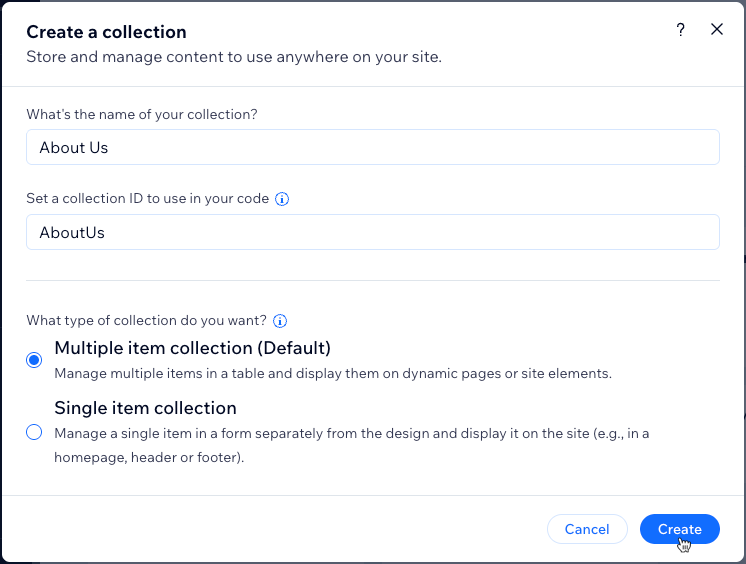
Enter a name for your collection.
(Coding only) Enter a collection ID to use in your code.
Select Multiple item collection (Default) and click Create.
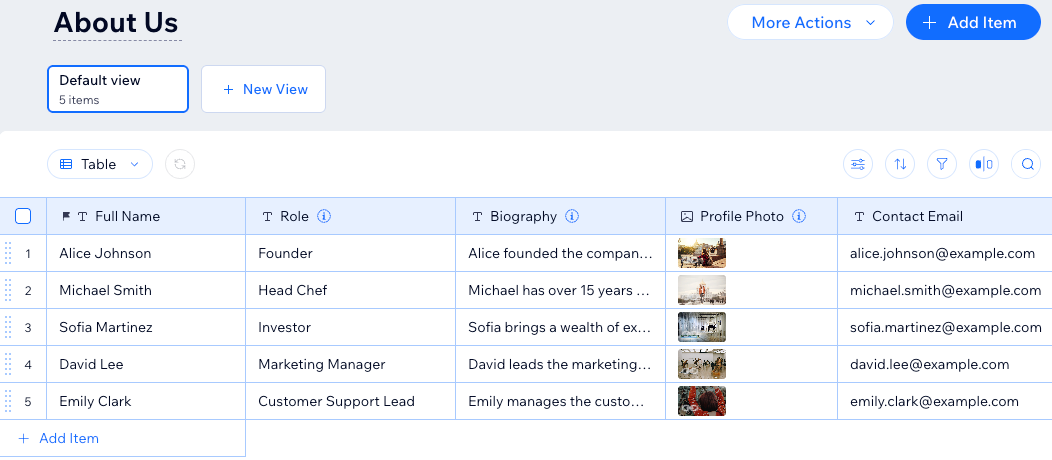
Click + Add Field to begin adding fields to your collection manually.
Add items to your collection:
Tip: Skip this step if you plan to use the collection to store user submissions.
Click + Add Item at the top right.
Enter details about the item in all the relevant fields and click Save.
Repeat these steps to add more items to the collection.
Next, learn how to:
Create a dynamic list page to showcase your collection items in one place.
Create a custom view with saved filters and sorts for future use.
Sort and filter the items in your collection view.
Mirror the order of your collection items to your live site.
Add field validations to create mandatory, required fields.
Set items to 'Published' or 'Draft' from your collection.
Add default values that automatically populate in fields when a new item is added.
Duplicate your collection to create a copy of its field structure and settings.
FAQs
Click below for answers to the most frequently asked questions about CMS collections.
Can I restore my collections to previous versions?
Yes, you can use backups to revert your collections to older versions. Learn more about backing up your CMS collections.
What content can I store in each field type?
The field type you choose determines what kind of content you can store in the field. Choose from the following CMS field types:
Essentials:
Text: Store plain text for use with titles, descriptions, and other text-based content.
Rich Text: Create and manage text using formatting options, directly in your CMS.
Rich Content: Create and manage content with rich text formatting, media embeds, and other advanced features directly in your CMS.
URL: Store web addresses for use with creating hyperlinks and navigational links. You can use the following formats only: http://, https://, ftp://, mailto:, sms:, tel:
Note: Web addresses must be in the format http:// or https://. Entries that start with www. are automatically converted to http://.
Email: Store email addresses. This field ensures the address is in a valid format so links work correctly. You can connect it to buttons to allow visitors to send emails with one click.
Number: Store numerical data for various purposes (e.g. quantity, price, dimensions).
Boolean: Store binary "true" or "false" values that appear as checkboxes in the collection fields.
Color: Save HEX numbers that represent colors. You can use the colors in connected text elements, buttons, and section backgrounds.
Organization & Reference:
Reference: Create a relationship between content items by referencing another content item.
Multi-Reference: Create many relationships between content items by referencing multiple other content items. Those references can also be linked to multiple sources.
Tags: Manage and categorize content items using keywords or descriptive labels.
Category: Assign items to categories for organizing and filtering content. Categories are managed in category collections and create automatic two-way connections. When you add a 'Category' field, Wix automatically creates an 'Assigned Items' field in the connected category collection and a hidden 'Primary Category' field in your items collection. Learn more about using category collections.
Media:
Image: Store image files such as JPG, PNG, and GIF file types.
Tip: You can add images to fields by pasting their image URLs in the fields.
Media Gallery: Store multiple images or videos in each field.
Video: Store single video files for each item using file types such as AVI, MPEG, MOV and more.
Audio: Store single audio files for each item using file types such as MP3, WAV, FLAC, and more.
Document: Store single document files for each item such as PDFs, CSVs, and more. Tip: You can add documents to fields by pasting their document URLs in the fields.
Multiple documents: Store multiple document files for each item. You can also add multiple documents to fields by pasting their URLs in the fields.
Digital asset: Store one secured file per item for delivery to customers after purchase. Only available in catalog collections, where it can be mapped as the digital file for sale. Learn more about the 'Digital asset' field type.
Time and location:
Date: Store date values associated with content items.
Note: The Include time field checkbox has been replaced by the 'Date and Time' field type. If you previously enabled Include time field for a 'Date' field, it was automatically converted to 'Date and Time'. No action is needed, and your existing data was kept.
Date and Time: Store both date and exact time values associated with content items.
Time: Store time information for associated items independently of the date.
Address: Store structured data for physical addresses such as street names, city, state or province, postal code, and country.
Javascript (Velo code):
Object: Manage complex and structured data using custom objects or data structures. You can use the object field type to store and organize multiple related pieces of data as a single unit.
Array: Input and manage multiple values within a single field. You can use the array field type to handle a collection of related data, such as a list of options, tags, or other sets of related values.
Learn more about supported field types and their limitations.
Can I choose field types when importing a CSV file to a collection?
Yes. During the import process, you can choose the field type used for each field you import.
By default, when you import a CSV file to your collection, the first row in your file is used as the field names and the field types are automatically detected. You can choose which columns from your file you want to import as fields. For each column you import, you decide whether to create a new field or match it to an existing collection field. You can also change the field name and field type that are automatically configured.
If you import data to a field that does not match the field type, a warning message will appear in the relevant collection fields in the CMS. You can change the field type for the entire column in your collection or, if available, convert the data in each field to the relevant field type.
Learn more about importing content to a collection.
What's the difference between content, catalog, and category collections?
Content collection: A general-purpose collection for storing any managed content (e.g., team members, blog posts, testimonials, portfolios). Content collections connect to dynamic pages and site elements. When creating a content collection, you can choose between:
Multiple item collection: Manage multiple items in a table layout for displaying on dynamic pages or site elements.
Single item collection: Manage a single item in a form layout for displaying on static pages (e.g. a promotional banner on the homepage, header, or footer). Learn more about single item collections.
Catalog collection: A collection specifically for items you want to sell directly from your site. Catalog collections include cart and checkout functionality. Learn more about selling items from catalog collections.
Category collection: A collection for organizing and categorizing items in other collections. Category collections can contain up to 1,000 items and connect to items collections through 'Category' fields. Learn more about using category collections to organize your content.
What's a preset?
A preset is basically a template for creating dynamic pages in the CMS.
Each preset includes:
A sample collection with content that connects to your dynamic pages.
A dynamic list page that showcases the collection items in a gallery or repeater.
A dynamic item page that displays details about individual collection items.
When you add a preset, the dynamic pages and their connected collection are automatically added to your editor. You can then customize them to fit your needs. Learn how to choose from several customizable presets.
What's a dynamic page?
Dynamic pages use a consistent layout and design, while changing their content based on the page's connected collection items.
There are several types of dynamic pages:
Dynamic list pages: These can showcase several items from a collection in galleries or repeaters. They allow visitors to click an item to go to its dynamic item page where they can view more details about the selected item.
Dynamic item pages: These are automatically created for every item in your page's connected collection. They display details about individual collection items in various page elements that connect to fields in your collection.
Dynamic category pages: Display items organized by category using a category collection. Each category gets its own version of the page. Learn more about creating dynamic category pages.
Learn more about:
Can I create a copy of a CMS collection?
Yes. You can duplicate a collection to create a copy that uses the same field structure and settings.
This article is credited to the Wix team - https://support.wix.com/ and we thank them for that!