If you have a premium app subscription, you can choose to either upgrade or cancel your plan. You cannot downgrade to a lower-tier plan.
If you choose to cancel, your premium app subscription will remain active until the end of your current billing cycle, and auto-renewal will be turned off.
Changing an app subscription
Choose the right subscription for your business needs for each app installed on your site.
To change an app subscription:
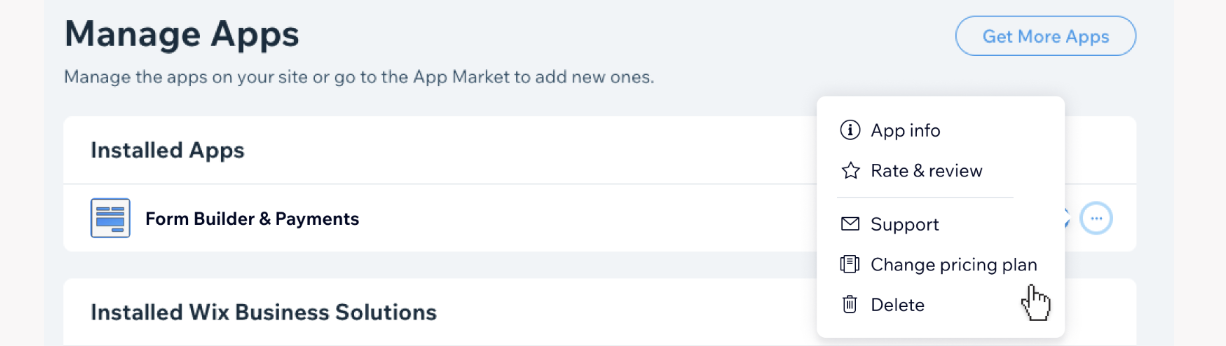
Go to Manage Apps in your site's dashboard.
Click the More Actions icon

next to the relevant app.
Click Change pricing plan.
Select the plan you want to change to.
Click Change Plan.
FAQs
Click a question below to learn more about changing a premium app subscription.
How does Wix calculate the extension of my subscription?
To determine how many days to add to your new subscription, the following calculation is automatically performed:
Extension = (Balance / New Daily Plan Price) - Days Left
What do these terms mean?
Balance: Days Left x Old Daily Plan Price.
New Daily Plan Price: The price of the new plan divided by the total number of days (i.e. 365).
Days Left: The number of days left of your original plan.
Old Daily Plan Price: The price of the original plan divided by the total number of days (i.e. 365).
Is the change in price immediate or do I have to wait until my subscription renews?
Yes, the change in the price is immediate.
This article is credited to the Wix team - https://support.wix.com/ and we thank them for that!