Having a Business Phone Number allows your customers to call, text, or leave voicemails for your business. If you signed up for a business number, but decide you no longer need it, you can cancel the subscription before it automatically renews.
To cancel your business phone number:
Go to Premium Subscriptions in your Wix account.
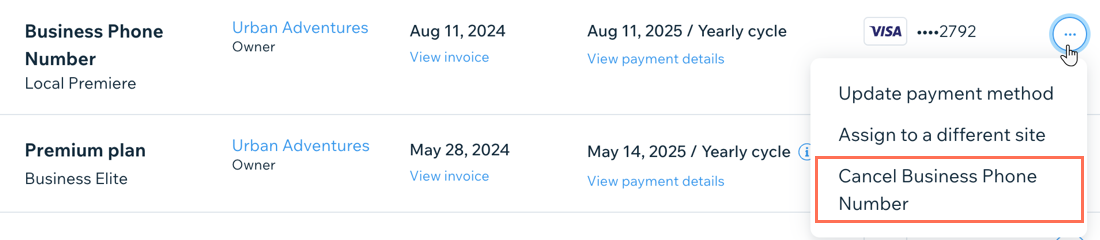
Click the More Actions icon

next to the Business Phone Number you want to cancel.
Select Cancel Business Phone Number.
Select Cancel auto renew.
Click Cancel now.
Important:
If you turn off the auto-renewal of your phone number subscription, you can still choose to revert to auto-renewal if you change your mind before the expiry date.
If you cancel your Business Phone Number within the first 14 days after initial purchase, the plan will be canceled and refunded immediately.
The 14 day money back guarantee period does not apply to renewal payments.
This article is credited to the Wix team - https://support.wix.com/ and we thank them for that!