Reassign a Premium plan from one site to another within your Wix account to suit your needs.
Before you begin:
If you reassign a Premium plan, the premium features (e.g. the ability to connect a domain, removal of Wix ads) are removed from the original site.
Assigning your Wix Premium plan to a Wix Studio site requires an upgrade to a Wix Studio plan. Upgrades can only be made to plans which offer more features.
Statistics and data related to email campaigns do not transfer with the email campaigns themselves. In addition, data related to site-specific features (e.g. apps, SEO settings and tracking tools, analytics) does not transfer.
To reassign your Premium plan:
Go to Premium Subscriptions in your Wix account.
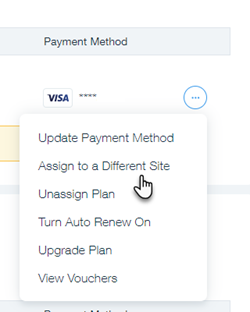
Click the More Actions icon

next to the plan you wish to reassign.
Click Assign to a Different Site.
Select the checkbox next to the relevant site.
Click Next.
Click Assign to confirm.
Already unassigned your Premium plan?
Follow the instructions to assign your plan to another site.
Video tutorial
This article is credited to the Wix team - https://support.wix.com/ and we thank them for that!