Important:
This article refers to the original Wix Hotels app. If you are using the new Wix Hotels by HotelRunner, read this article. Learn how to check which version of Wix Hotels you are using.
The Wix Hotels Search Bar allows potential guests to check what accommodation you have available from any page of your site. It's a great idea to add the Search Bar to your home page so visitors see it as soon as they arrive.
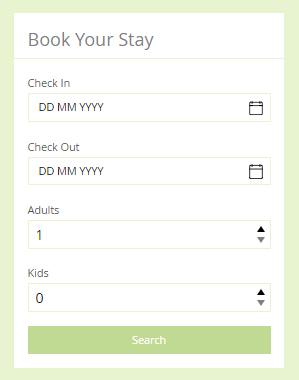
To add a search bar:
Click the Wix Hotels app in the Editor.
Click Settings.
Click the Add-Ons tab.

Click the Add to Site drop-down next to Search Bar.
Select the page you want to place the search bar on.
(Optional) Drag the search bar to place it and use the stretch handles to resize it.

Click Settings.
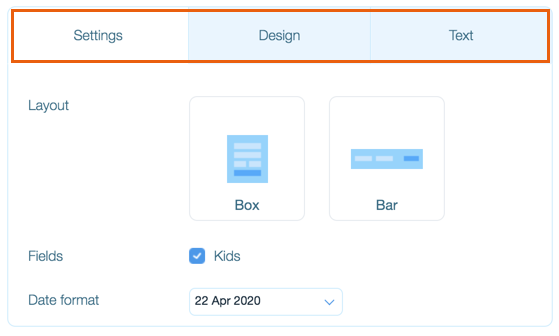
Click the following tabs to customize the Search Bar to suit your needs:
Settings
Layout: Select a layout for your search bar.
Fields: Select or deselect the Kids checkbox to show or hide this field.
Note: This is useful if your hotel or rental property does not allow children.
Date format: Click the drop-down and select your preferred date format.
Design
Titles text: Select the color and font of the title text.
Body text: Select the color and font of the body text.
Background: Select the background color and drag the slider to change the opacity.
Buttons background: Select the background color of the buttons and drag the slider to change the opacity.
Buttons text color: Select the button text color and drag the slider to change the opacity.
Separators color: Select the separator line color and drag the slider to change the opacity.
Fields background: Select the field background color.
Fields text color: Select the field text color.
Text
Title: Edit the title text.
Date Labels: Edit the check in and check out text.
Guest Labels: Edit the Adult and Kids text.
Button label: Edit the search button text.
Tip:
You can place the Search Bar on multiple pages of your site, and design each one differently.
This article is credited to the Wix team - https://support.wix.com/ and we thank them for that!