Wix Analytics Search Engine Optimization (SEO) reports help you better understand and improve your site's SEO based on your business's information and keywords. Learn what search queries bring the most traffic to your site from Google. You can also use these reports to learn how search engine bots crawl your site.
How to access your SEO reports:
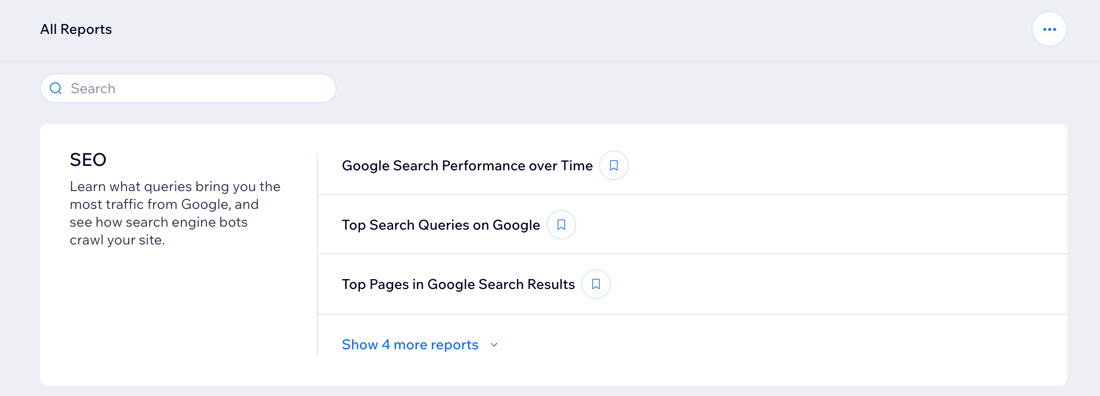
Go to All Reports in your site's dashboard and scroll down to the SEO section.
Tip:
To learn more about improving your site's SEO, create an SEO checklist with Wix's SEO Setup Checklist.
Types of SEO reports
See how many impressions and clicks your site gets from Google search queries as well as which queries show your site most often in search results.
Click a report type below to learn more about it.
Google Search Performance over Time
The Google search performance over time report shows you how the search terms that display your site in search results are performing over different time periods.
Use this report to:
See the impressions, clicks and click-through-rate that Google search queries are generating for your site.
Learn how your site performs for different Google searches.
Top Search Queries on Google
The top search queries on Google report shows you which search queries are most likely to show your site on Google search results.
Use this report to:
Learn how your site performs for different Google searches.
See which searches are returning the best results.
Top Pages in Google Search Results
Use this report to discover which of your site pages are performing best on Google search results.
Average Position in Google over Time
This report lets you see how different search queries are ranking over time based on how often they show your site in search results.
Use this report to:
Compare search query performance over different time periods.
Analyze which terms are performing or underperforming and implementing the data into future content or marketing efforts.
Bot Traffic over Time
The bot traffic over time report shows you which search engine and social network bots crawl your site over different time periods. By default, your report will display results for the most common bots.
Use this report to:
Find out which bots are crawling your site.
See how your site's bot traffic changes over time.
Bot Visits by Page
The bot traffic by page report shows you which of your site pages get the most bot activity.
Use this report to:
Learn which of your site pages are crawled the most.
Monitor your site's crawl budget.
AI Bot Traffic over Time
The AI bot traffic over time report shows you how often AI bots crawl your site in response to user queries and for training.
Use this report to:
Find out which AI bots are crawling your site.
See how your site's AI bot traffic changes over time.
AI Bot Visits by Page
The AI bot visits by page report shows you which site pages are crawled by AI bots in response to user queries and for training.
Use this report to:
Learn which of your site pages are crawled the most by AI bots.
Monitor your site's crawl budget.
Response Status over Time
Use this report to find out if any of your site pages are experiencing issues which require your attention.
Use this report to:
Find out if your site has any problematic pages that need fixing.
Learn about the errors that bots encounter on your site, based on your log file analysis.
See if redirects are working as intended.
FAQs
Click a question below to learn more about the SEO reports.
What does a 'crawl budget' mean?
Search engines and social network bots crawl your site pages in order to index them and determine which pages to offer in search results. The exact amount of site pages that they crawl is your site's crawl budget. It depends on your site's popularity and how often you add new and relevant content.
Why is some data missing from my site performance reports?
The data on your site's Google search performance is taken from Google Search Console. Performance data from Google isn't available instantly. Some of the more recent data (e.g. in the last 72 hours) may not appear yet.
What is a click vs. an impression?
Google counts a click as any click that takes someone away from Google's search to a non-Google search page. An impression is when someone sees a link to your site in search results but does not click on it.
Learn more about the difference between clicks and impressions.
What is a response status code in the 'Response Status over Time' report?
Status codes are server responses which tell us if a request is successful or not. For example, if you click a link and the page shows the status "404: Page not found", this means the page you're trying to reach has been unpublished, or the URL is incorrect.
There are five classes of status code, and the first number indicates the server response:
1XX = Informational response. Request received and understood.
2XX = Success. Request received, understood, and accepted.
3XX = Redirection. An additional action was taken to complete the request.
4XX = Client error. There was an error in the request and could not be completed.
5XX = Server error. The server could not complete the action.
This article is credited to the Wix team - https://support.wix.com/ and we thank them for that!